 University IT
Special Characters
Many special characters convey different meanings to screen reader users. For example:
5 x 2 - 3 = ?
With a screen reader this announces as "Five X Two Dash Three Equals Question Mark."
However, when using the correct special characters for the math symbols the equation looks the same, but will announce differently.
5 × 2 − 3 = ?
This correctly announces as "Five Times Two Minus Three Equals Question Mark."
In HTML this looks like:
<p>5 × 2 − 3 = ?</p>While not every character is read perfectly by screen readers, using the correct character significantly improves accuracy.
Microsoft Office
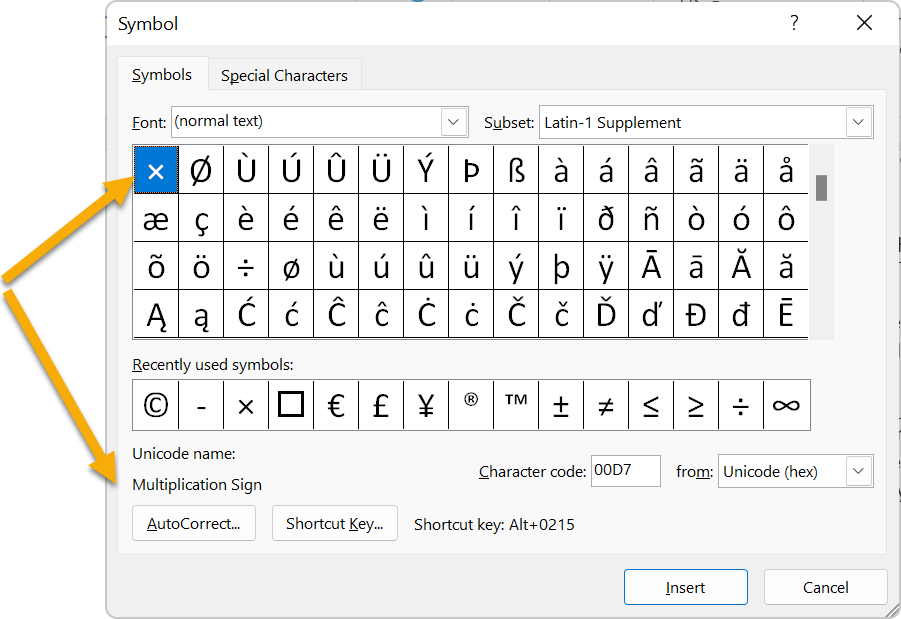
To insert special symbols in MS Word and other Office products, go to the Insert tab and select Symbol. The menu displays each character's meaning.
Web
HTML offers many special characters. Find a complete list at the Unicode Table website or look up common HTML entities used for typography. Note that HTML often provides multiple codes for the same character—for example, both © and © produce ©.
