 University IT
All Caps (and Small Caps)
Readers recognize words by shape before individual letters. All caps and small caps create uniform rectangular shapes, reducing readability for some users. Additionally, screen readers may interpret these text in all caps as acronyms, misinterpreting the content.
Regular case creates distinct word shapes that improve comprehension.
Use all caps sparingly and strategically. While acceptable for some headings, avoid capitalizing entire sentences or paragraphs.
Comparison
Read the following passage in all caps:
WHEN IN THE COURSE OF HUMAN EVENTS, IT BECOMES NECESSARY FOR ONE PEOPLE TO DISSOLVE THE POLITICAL BANDS WHICH HAVE CONNECTED THEM WITH ANOTHER AND TO ASSUME AMONG THE POWERS OF THE EARTH, THE SEPARATE AND EQUAL STATION TO WHICH THE LAWS OF NATURE AND NATURE’S GOD ENTITLE THEM, A DECENT RESPECT TO THE OPINIONS OF MANKIND REQUIRES THAT THEY SHOULD DECLARE THE CAUSES WHICH IMPEL THEM TO THE SEPARATION.
Now, read the same passage in regular case:
When in the course of human events, it becomes necessary for one people to dissolve the political bands which have connected them with another, and to assume among the powers of the earth, the separate and equal station to which the Laws of Nature and Nature's God entitle them, a decent respect to the opinions of mankind requires that they should declare the causes which impel them to the separation.
The passage is likely easier to read in regular case.
Implementing All Caps
Using CSS or software formatting for all caps is preferable to manually typing in capitals, as it prevents screen readers from misinterpreting content as acronyms. However, all caps still reduces readability for other users.
If all caps are necessary, apply them programmatically:
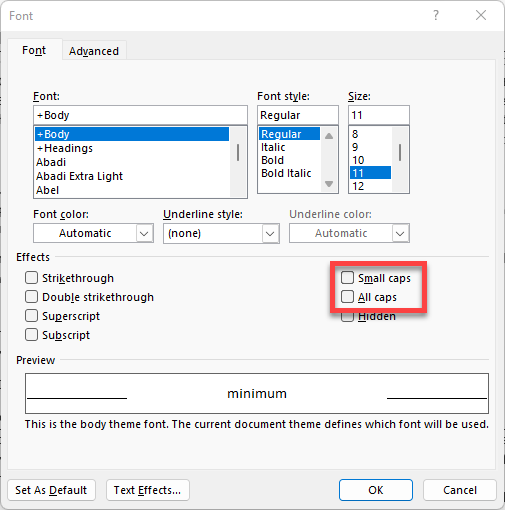
MS Word: Select text, then choose "All Caps" in the font menu.
HTML/CSS: Use the text-transform property.
<p>DON’T DO THIS!</p>

<p style="text-transform: uppercase;">Do this instead, if you must.</p>