 University IT
Stanford AI Playground FAQs
Have questions about the Stanford AI Playground? You’re in the right place. Here, we’ve compiled answers to the most common questions about the platform. If your question isn't answered here or in the AI Playground Quick Start Guide, please request help from the team.
AI (General)
What is GenAI?
Generative Artificial Intelligence, also known as GenAI, is a type of AI which can generate original text, visual, and audio content by learning patterns from provided samples of human generated data.
Explore overall GenAI frequently asked questions.What is an LLM?
LLM stands for large language model, and is a type of Generative AI which specializes in text-based content and natural language. By using LLMs to enhance the interface between the person requesting content and the generative AI tool creating the content, LLMs can help generate more specific text, images, and custom code in response to prompts.
Explore overall GenAI frequently asked questions.What is a token? What is tokenization?
Large language models (LLMs) will break down your prompts, as well as the responses they generate, into smaller chunks known as tokens. This tokenization makes the data more manageable for the LLMs and assists it in processing your data.
There are many methods of tokenization, and this process can vary between models. Some models may break your prompts down into individual words, subwords, or even single characters. This can change how your data is interpreted by the LLMs and is one of the many factors which can lead to receiving different answers to the same prompt.Please note that there is a limit to how many tokens any AI model can handle at one time. To learn more about this context limit, see the next FAQ item.
What are the context limits of LLMs?
You are likely used to referring to data in regards to file size such as bytes, megabytes (MBs), or gigabytes (GBs). However, the limits for LLMs are generally measured in the number of tokens needed instead of file size. This is generally referred to as the "context limit" and this can vary model to model.
Tokens and context limits do not translate directly to file size. This is partially due to variance in the method of tokenization across models. A very rough rule of thumb for translating file size into context limit, is that every four English characters translates to roughly one token. That means that each token might average around 4 bytes for typical English language text. Most models have a context size between 32,000 and 200,000 tokens. Even models with a 1,000,000 token context limit would fail to process the entirety of a 5MB text file.It is important to note that the context limit of a model isn't simply noting how much it can intake or output at one time, but also includes the total length of all tokens that it can keep track of across an entire conversation.
Anthropic has a great page explaining context windows, and how they grow as the conversation continues. You can view it here: https://platform.claude.com/docs/en/build-with-claude/context-windows.What are hallucinations and why do they happen?
Hallucinations are when AI models generate output that is factually incorrect or entirely made up, even if it sounds correct. Hallucinations are an inherent limitation of large language models (LLMs) and cannot be fully eliminated at this time.
While hallucinations are often seen as a weakness, they can also be a strength. Hallucinations sometimes provide necessary creative or innovative responses that can spark new ideas in research or problem-solving. While this can aid in creative pursuits, and even research, hallucinations are just another reason it is critically important to verify the output of AI models.
What is the estimated energy cost and environmental impact of using GenAI?
Each GenAI model and tool uses energy differently. While the AI landscape continues to evolve, research and reporting currently indicate these energy costs:
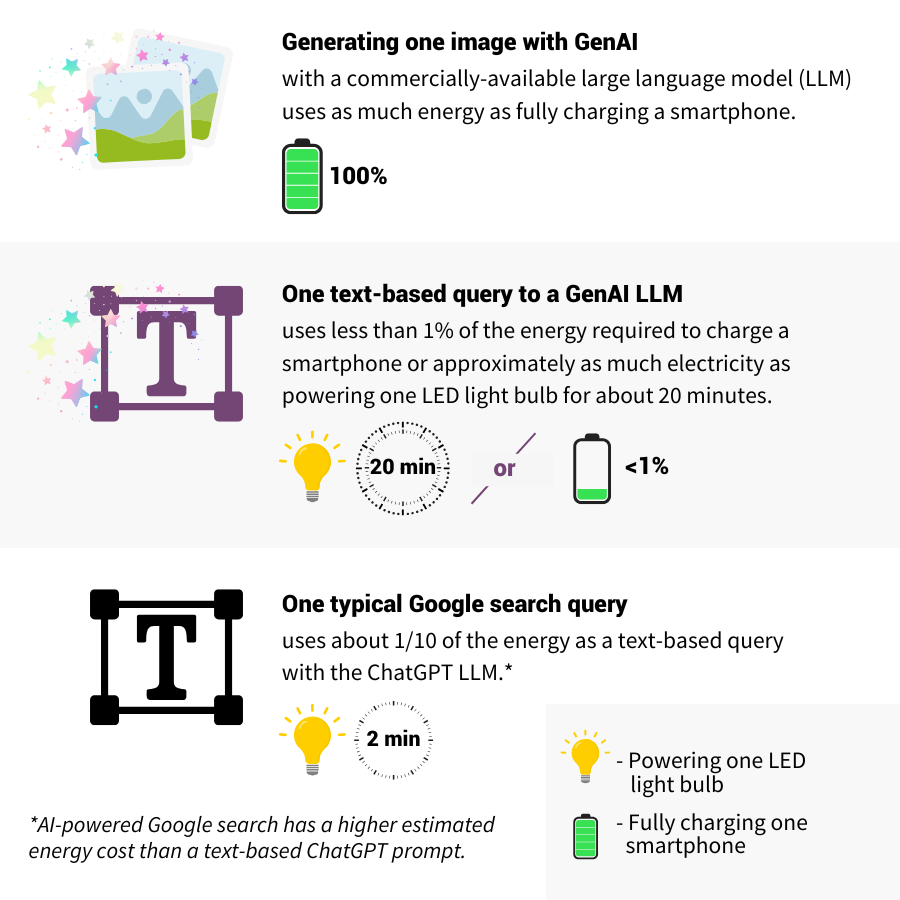
For sources and additional reading, visit:Where can I learn more about the university's guidance on the use of GenAI tools?
University Communications published AI Guidelines for Marketing and Communications. The guidelines promote responsible, ethical, and legally compliant practices that align with the university’s mission and values.
Additionally, University IT has compiled a list of several university specific resources on AI. You can view the complete list of these resources at GenAI Topics and Services List.
Is there a list of Stanford approved AI tools?
The Responsible AI at Stanford webpage hosts the GenAI Tool Evaluation Matrix. This matrix contains a list of AI tools, what they do, their availability, and their status at the university. Please refer to that resource for more information about what tools are approved for use with Stanford data.
Am I allowed to use DeepSeek and is it safe?
A secure, local version of DeepSeek is available within the AI Playground. As a reminder, personal health information (PHI) in attachments or prompts is not approved for use within any AI Playground model.
Outside of the AI Playground, please refrain from using models like DeepSeek-R1, hosted by the non-US company DeepSeek, for any Stanford business. This includes connecting to DeepSeek APIs over the internet or using the DeepSeek mobile application to process confidential data, such as Protected Health Information (PHI) or Personally Identifiable Information (PII). Currently, there is no enforceable contract in place between Stanford and DeepSeek that meets the risk management standards for HIPAA compliance and cybersecurity safeguards. As a result, using non-US DeepSeek models poses unacceptable risks to data security and regulatory compliance.
About the AI Playground
What are the benefits of the Stanford AI Playground?
The AI Playground is designed to let you learn by doing. With this environment, you can practice optimizing work-related tasks, such as: content generation, administrative tasks, coding and debugging, analyzing data, and more. Note: The Playground is approved for High-Risk: non-PHI Data. Refrain from inputting PHI Data.
The Playground is protected by Stanford's single sign on system and all information shared with the AI Playground stays within the Stanford environment.
Can the AI Playground generate images, charts, graphs, etc. like ChatGPT and Anthropic?
Yes. The AI Playground is capable of many advanced features like image generation, creating charts and graphs based on provided data, as well as writing and rendering programs on screen. Below are a few screenshots of these features in action.
Image generation: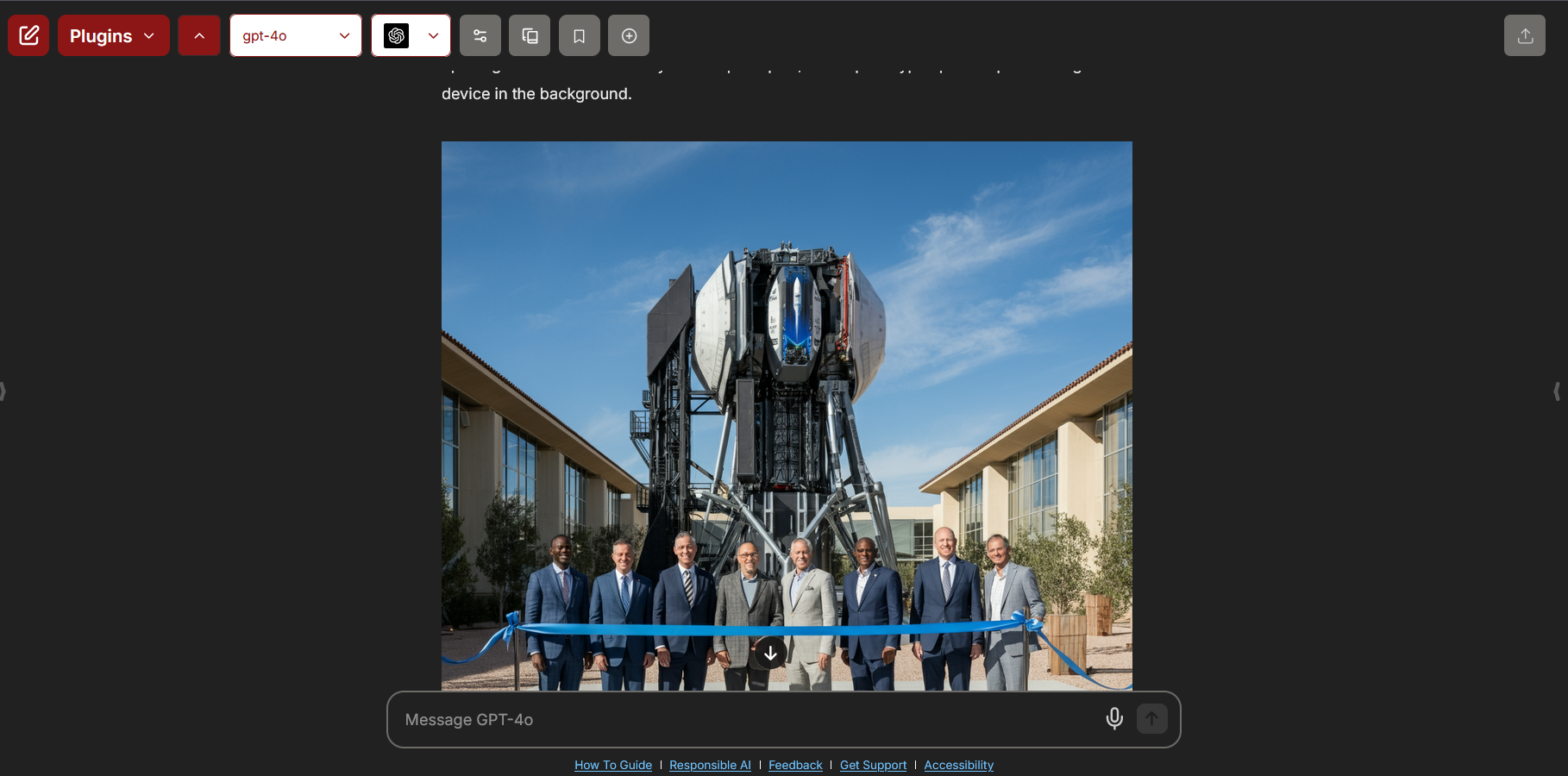
Creating a chart from a provided data set:
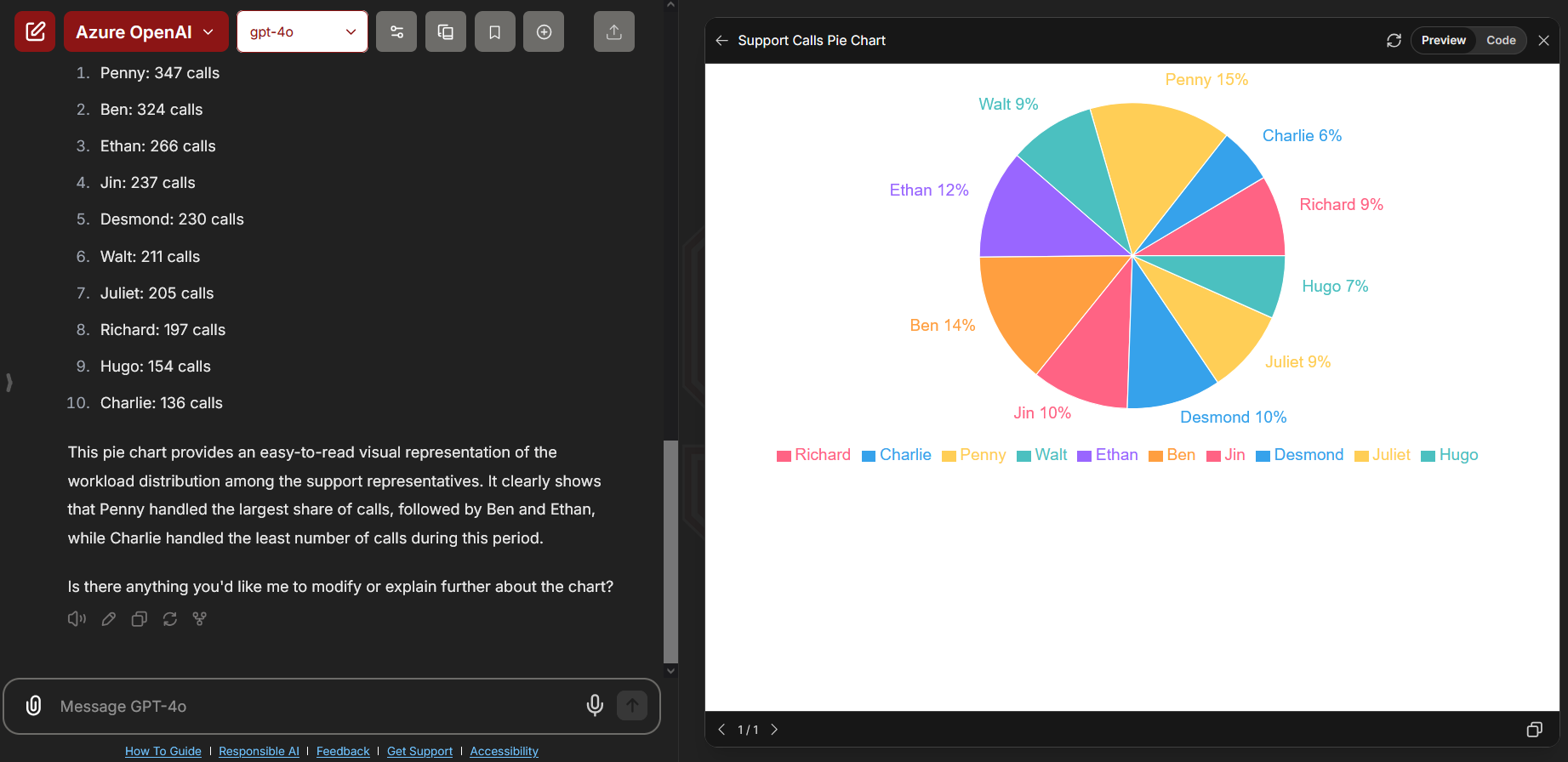
Building a dashboard from example and attached data:
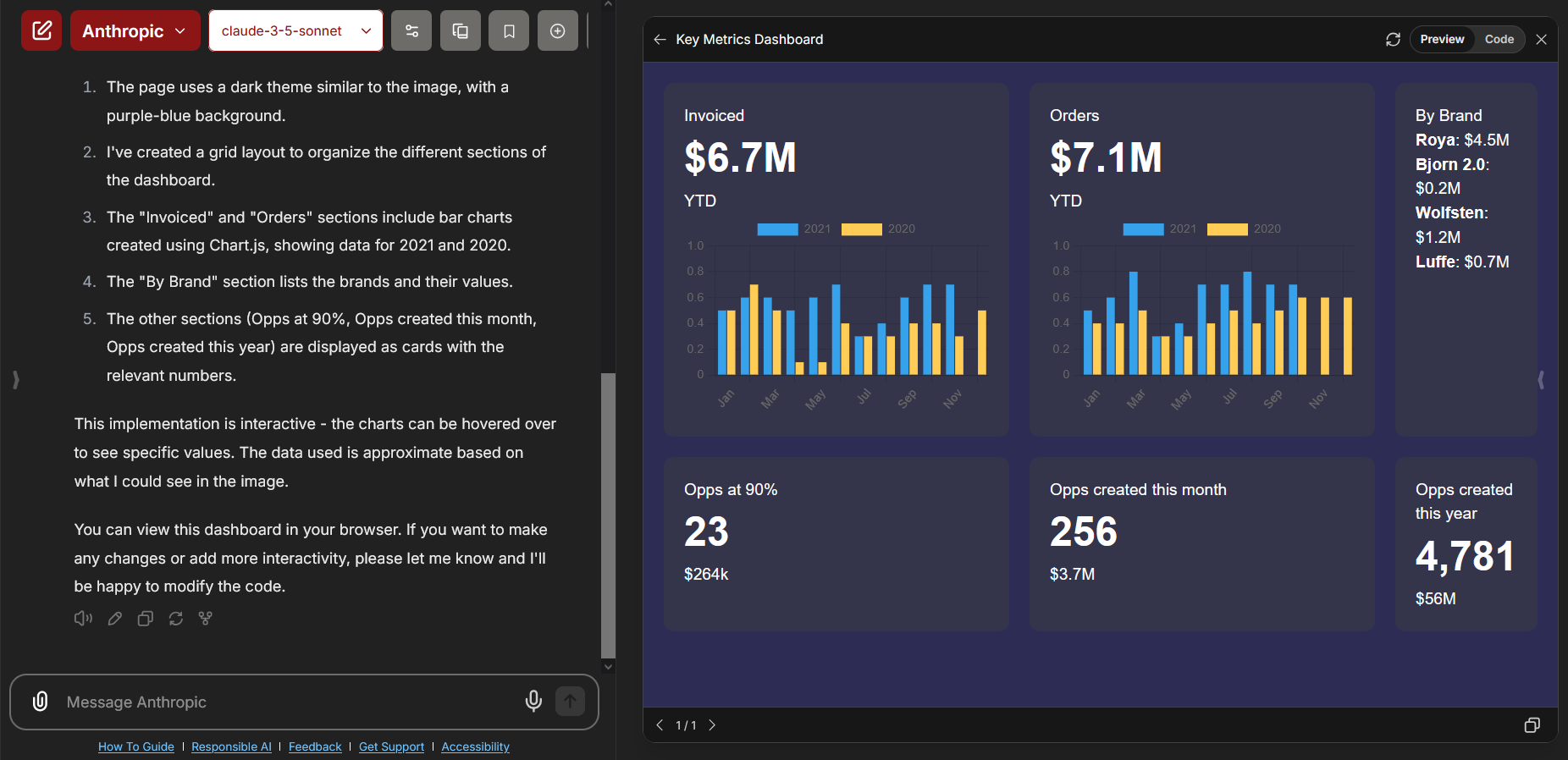
If the AI Playground states that it cannot directly render or run code, you may need to enable the Artifacts feature. Please view the related FAQ item in the Troubleshooting Common Errors section of the FAQ.
What is coming next with the AI Playground? Is there a roadmap?
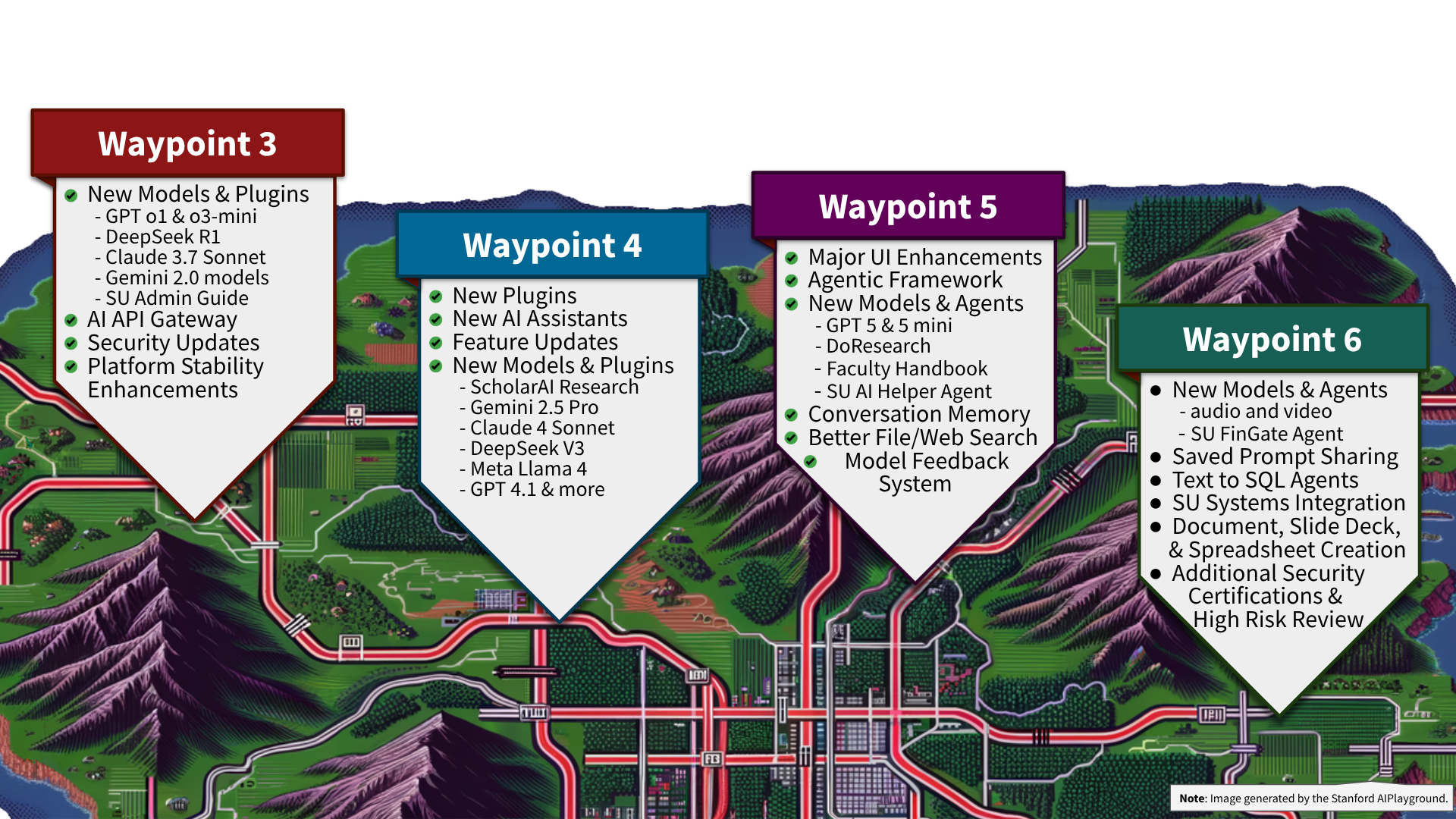
The team has many exciting new features planned for the future. Some of these possible new features include:
- Admin Guide AI assistant agent (released Mar. 20, 2025)
- AI API Gateway provides direct API access to models (released Apr. 7, 2025)
- Faculty Handbook and DoResearch AI agents (released Jul. 04, 2025)
- Stanford AI helper agent to answer questions about GenAI, the Playground, and Stanford AI guidelines
- Stanford prompt library
- Saved prompt sharing
- Ability to save files within saved prompts
- Text to SQL agents
- Conversational memory about the user
- AI agents integrated with SU enterprise systems
- Document, slide deck, spreadsheet creation
- AI agents for other Stanford services
Due to the speed at which GenAI tools are developing, it can be difficult to maintain a list of models on the roadmap. Below is a list of some models we are reviewing for a possible future release within the AI Playground:
- DeepSeek R1 model (released Feb. 13, 2025)
- Scholar AI Research Assistant (released Apr. 17, 2025)
- Sora
- Whisper
- DeepResearch models
- Perplexity
- Vision models
Please note that not all new AI features can be added to the Playground. The roadmap is subject to change, and it is possible that items on the roadmap may not be able to be implemented.
For a complete list of past updates, please view the AI Playground Release Notes page.
I have a great idea for the Playground. How do I make a suggestion for the roadmap?
The AI Playground's roadmap is largely driven by feedback from the Stanford community. If you would like to make a suggestion, please use the Feedback Form linked here or at the bottom of the AI Playground itself.
The Feedback Form should not be used to report technical issues or ask questions. You will not receive a response from submitting suggestions to the Feedback Form.
How do I request an API key for direct access to the models in the AI Playground?
Direct API access to the models in the AI Playground was released on April 7, 2025.
Learn more about this exciting new feature at the AI API Gateway service page and request the creation of a new API key via the Add AI API Gateway Key form.
Does the Playground support Model Context Protocol (MCP) or custom agents?
Not presently. While the open source software used to power the Playground does support MCP, it is only being used for some of the integration features. The UIT team is not able to make agent configurable MCP customizations available to Stanford users at this time.
You can build your own AI tool using the AI API Gateway. The AI API Gateway allows you to create your own AI tools and integrations using the same models available in the AI Playground. Learn more about this exciting new feature at the AI API Gateway service page and request the creation of a new API key via the Add AI API Gateway Key form.
How often is the AI Playground updated? How often are new models released?
The UIT team wants to make sure the Playground is a safe and useful space for the Stanford community. As a result, the AI Playground is updated regularly. This includes feature updates, new models, platform updates, security enhancements, and performance improvements.
The release of new AI models is largely driven by feedback from the Stanford community. For more information on our plans for the future, check the FAQ entry above titled, "Is there a roadmap? What is coming next with the AI Playground?"
For information about past updates, please review the AI Playground Release Notes page. That page contains a list of every major update to the AI Playground since its release in the summer of 2024.
How often is the information used in the Stanford specific agents updated? (e.g. Admin Guide, DoResearch Handbook, etc.)
The information in the Stanford specific agents is updated monthly. This includes the agents related to the Admin Guide, DoResearch Handbook, and Faculty Handbook.
Does the AI Playground have conversation sharing or team collaboration capabilities?
You are able to share your conversations with other Stanford users. The AI Playground team is also working on a feature which will allow you to share your saved prompts with other Stanford users.
More advanced collaboration capabilities are not available within the AI Playground at this time.
Is the Stanford AI Playground a custom software or a product?
The AI Playground is built on the opensource LibreChat platform, with a flexible infrastructure behind the scenes that allows the UIT team room to change and grow the Playground over time.
Does UIT limit the available context windows of models available in the AI Playground?
No. UIT does not restrict or impose any limits on context length. Each model in the Playground runs with the full context window supported by that model specifically. This means you can take advantage of the larger capacities available in modern models without any restrictions.
Who can access the AI Playground?
The AI Playground is accessible to all active Stanford faculty, staff, students, Postdocs, Visiting Scholars, sponsored affiliates, and fellows. The Playground works with both full and base SUNet IDs.
To access the AI Playground, a SUNet ID must be a member of one of the following groups:
stanford:faculty
→ stanford:faculty-affiliate
→ stanford:faculty-emeritus
→ stanford:faculty-onleave
→ stanford:faculty-otherteaching
stanford:staff
→ stanford:staff-academic
→ stanford:staff-emeritus
→ stanford:staff-onleave
→ stanford:staff-otherteaching
stanford:staff-affiliate
stanford:staff-casual
stanford:staff-retired
stanford:staff-temporary
stanford:staffcasual
stanford:stafftemp
stanford:student
→ stanford:student-incoming
→ stanford:student-onleave
stanford:student-ndo
stanford:student-postdoc
stanford:affiliate:visitscholarvs
stanford:affiliate:visitscholarvt
stanford:affiliate-sponsored
stanford:affiliate-fellow
Please note that students, postdocs, and visiting scholars do not have access to image generation models at this time.
What is the Carbon Footprint of the Stanford AI Playground in particular?
The UIT team takes the matter of sustainability seriously. In addition to the technical factors weighed in selecting the best location for this service, the team evaluated different cloud infrastructure options for their carbon footprint. The AI Playground's cloud infrastructure is hosted in regions that are rated "Low Carbon". You can learn more about this rating here: Carbon free energy for Google Cloud regions.
Do these FAQs apply to the AI API Gateway? Where can I learn more about the AI API Gateway?
The AI API Gateway is a parallel, but separate service to the AI Playground.
The AI API Gateway has its own unique service page, FAQ page, a page listing the available models and rates, as well as other specific service materials. Please review the AI API Gateway pages for information specific to that service.
Is the AI Playground sustainable? How impactful is the Stanford AI Playground on the environment?
UIT is very concerned about the energy usage of AI and the environmental impact of the AI Playground. See the question in the section above title, "What is the estimated energy cost and environmental impact of using GenAI?" for more information about the energy usage of AI.
For the AI Playground, University IT has taken steps to ensure that the select vendors and compute resources have a low carbon footprint. Based on a Business Affairs review, the university has a high confidence that the vendors used to power the AI Playground and the underlying technologies, provide a low carbon approach to accessing AI technologies.
Where can I learn even more about AI and the Stanford AI Playground in particular?
The AI Playground team is a very small group focused on the development of the AI Playground. We have worked with several other groups around campus to provide options for individuals and teams who might need additional assistance getting started with Artificial Intelligence:
GenAI Topics and Services List: https://uit.stanford.edu/ai/topics-services-list
UIT Tech Training custom consultations: https://uit.stanford.edu/service/techtraining/custom
AI Demystified trainings focused on AI: https://uit.stanford.edu/service/techtraining/ai-demystified
Prompting and AI resources on the GenAI site: https://uit.stanford.edu/ai/overview
Stanford AI Tinkery hands on assistance: https://ai-tinkery.stanford.edu/
SU Library guide to AI in Academic Research: https://guides.library.stanford.edu/c.php?g=1472003Additionally, the UIT Tech Training team offers an interactive and beginner-friendly course titled "AI Playground 101: Practice and Exploration". This class is a three hour long introduction to key GenAI concepts, effective prompt engineering, responsible AI use, and it explores the AI Playground through instructor led hands-on activities. The instructor for the class, Joshua Barnett, helped lead the development of the AI Playground and many other UIT initiatives on AI. Learn more about and sign up for this course at: Stanford AI Playground 101: Practice and Exploration Class Overview.
Using the AI Playground
There are so many models available, how do I know which one is best for my needs?
Each vendor and their specific LLMs have different strengths and weaknesses. By providing access to different models, UIT hopes to provide a plethora of options to the campus community.
Please note that there isn’t always a single best model for every task. In fact, many models can perform well depending on how the prompt is written, the complexity of the request, and the format of the input. Often, two or more models may excel at the same task in slightly different ways. The AI Playground is designed to encourage hands on exploration to learn which ones work best for your needs.
The chart below gives some recommendations for which models may excel at performing certain tasks.
Example Task Recommended Models Summarize a document or PDF gpt-5.6-terra, claude-sonnet-4-6, gemini-3.5-flash Answer questions about a long research paper or book gpt-5.6-sol, claude-opus-4-8, gemini-3.5-flash Analyze academic writing claude-opus-4-8, gpt-5.6-sol, gemini-2.5-pro Author a creative story, poem, or world building content claude-opus-4-8, gpt-5.6-sol, claude-sonnet-4-6 Write or reply to a friendly email gpt-5.6-terra, claude-sonnet-4-6, gemini-3.5-flash Respond to a grant or research communication claude-opus-4-8, gpt-5.6-sol, gemini-2.5-pro Generate marketing materials (emails and social media) claude-opus-4-8, gpt-5.6-terra, claude-sonnet-4-6 Summarize and format meeting notes or transcripts gpt-5.6-luna, claude-haiku-4-5, gemini-2.5-flash-lite Write or debug code from scratch claude-opus-4-8, gpt-5.6-sol, gemini-3.5-flash Generate images for a website or presentation Gemini-2.5 Flash Image Create a graph or chart based on uploaded data gpt-5.6-sol, claude-opus-4-8, gemini-2.5-pro Create simple HTML/CSS/JS code claude-sonnet-4-6, gpt-5.6-terra, gemini-3.5-flash Translate or work with multi-lingual content claude-opus-4-8, gemini-3.5-flash, gpt-5.6-sol Understand idioms or nuanced language in non-English texts claude-opus-4-8, gpt-5.6-sol, gemini-3.5-flash Process structured data (tables, CSVs, JSON) gpt-5.6-sol, claude-opus-4-8, gemini-3.5-flash Extract key info or fill out a form based on a document gpt-5.6-luna, claude-haiku-4-5, gemini-2.5-flash-lite Create a lesson plan or instructional handout gpt-5.6-terra, claude-sonnet-4-6, gemini-3.5-flash Get a fast answer to a general knowledge question gpt-5.6-luna, claude-haiku-4-5, gemini-2.5-flash-lite Brainstorm ideas for projects, titles, campaigns, etc. claude-opus-4-8, gpt-5.6-terra, claude-sonnet-4-6 Summarize web content from a live website URL gpt-5.6-terra, gemini-3.5-flash, claude-sonnet-4-6 Provide an executive summary of a large document or presentation gpt-5.6-sol, claude-opus-4-8, gemini-3.5-flash Solve a tough math problem or show symbolic derivation gpt-5.6-sol, claude-opus-4-8, gemini-2.5-pro Work on competitive programming challenges or puzzles gpt-5.6-sol, claude-opus-4-8, gemini-3.5-flash Generate technical documentation or API instructions claude-opus-4-8, gpt-5.6-sol, claude-sonnet-4-6 Draft a policy, guideline, or official statement claude-opus-4-8, gpt-5.6-sol, claude-sonnet-4-6 Summarize a PDF with images and graphs claude-opus-4-8, gpt-5.6-sol, gemini-2.5-pro Optimize existing code for performance/readability claude-opus-4-8, gpt-5.6-sol, gemini-3.5-flash Write FAQs or help create documentation gpt-5.6-terra, claude-sonnet-4-6, gemini-3.5-flash Write test cases and documentation for code claude-opus-4-8, gpt-5.6-sol, gemini-3.5-flash Perform sentiment analysis or tone review of text claude-opus-4-8, claude-sonnet-4-6, gpt-5.6-sol Draft interview questions and evaluation criteria gpt-5.6-terra, claude-sonnet-4-6, gpt-5.6-sol Generate charts and graphs for a data-driven report gpt-5.6-sol, claude-opus-4-8, gemini-2.5-pro Simulate a debate or write arguments gpt-5.6-sol, claude-opus-4-8, claude-sonnet-4-6 Perform a SWOT analysis for a project, team, or initiative gpt-5.6-sol, claude-opus-4-8, gpt-5.6-terra Compare and contrast two research papers or proposals claude-opus-4-8, gpt-5.6-sol, gemini-2.5-pro Analyze a dataset to find errors or anomalies gpt-5.6-sol, claude-opus-4-8, gemini-2.5-pro Help draft project plan and timeline with milestones claude-opus-4-8, gpt-5.6-sol, gpt-5.6-terra Write a marketing tagline, slogan, or branding message claude-opus-4-8, gpt-5.6-terra, claude-sonnet-4-6 Write SQL queries to extract information from a database claude-opus-4-8, gpt-5.6-sol, gemini-3.5-flash Create a chatbot that responds to questions quickly gpt-5.6-luna, claude-haiku-4-5, gemini-2.5-flash-lite Check a document for inconsistencies claude-opus-4-8, gpt-5.6-sol, gemini-3.5-flash Brainstorm counterarguments to a position or claim gpt-5.6-sol, claude-opus-4-8, claude-sonnet-4-6 Extract citations or bibliographic data from a paper claude-opus-4-8, gemini-2.5-pro, gpt-5.6-sol Write a quick update for a channel on Slack or Teams gpt-5.6-terra, gpt-5.6-luna, claude-haiku-4-5 Natural language summary of images/visuals (like a dashboard) claude-opus-4-8, gpt-5.6-sol, gemini-2.5-pro Simulate a tutoring or Q&A session gpt-5.6-sol, claude-opus-4-8, claude-sonnet-4-6 Discuss pros and cons of adopting a new tool or service gpt-5.6-sol, claude-opus-4-8, gemini-3.5-flash Generate potential risk scenarios for a simulation plan gpt-5.6-sol, claude-opus-4-8, claude-sonnet-4-6 Help create spreadsheet formulas gpt-5.6-terra, claude-sonnet-4-6, gemini-3.5-flash Perform statistical analysis or interpret statistical results gpt-5.6-sol, claude-opus-4-8, gemini-2.5-pro Review a document and suggest improvements claude-opus-4-8, gpt-5.6-sol, claude-sonnet-4-6 Identify action items, decisions, and owners from meeting notes gpt-5.6-terra, claude-sonnet-4-6, gemini-3.5-flash Draft requirements or user stories for a project claude-opus-4-8, gpt-5.6-sol, claude-sonnet-4-6 Create an outline from notes or source material gpt-5.6-terra, claude-sonnet-4-6, gemini-3.5-flash Proofread for grammar, spelling, and style claude-sonnet-4-6, gpt-5.6-terra, claude-opus-4-8 Rewrite text for clarity, concision, or a specific audience claude-opus-4-8, gpt-5.6-terra, claude-sonnet-4-6 Write regular expressions gpt-5.6-sol, claude-opus-4-8, gemini-3.5-flash Turn a process description into an SOP or step-by-step instructions gpt-5.6-terra, claude-sonnet-4-6, claude-opus-4-8 Identify themes across multiple documents claude-opus-4-8, gpt-5.6-sol, gemini-3.5-flash Analyze open-ended survey responses claude-opus-4-8, gpt-5.6-sol, gemini-3.5-flash Create or explain a workflow or process gpt-5.6-terra, claude-sonnet-4-6, gpt-5.6-sol Questions about the Stanford Admin Guide Admin Guide Search agent Questions about the FinGate system Financial Info Navigator agent Questions about the Playground and AI in general AI Helper agent Are there any limitations on the devices, OS, or browsers I can use to access the AI Playground?
There are no device or OS specific limitations for accessing the AI Playground. Any device capable of running an up to date, modern browser can use the AI Playground.
Is Cardinal Key required to access the AI Playground?
No. You should be able to access the AI Playground from any internet capable device with an up to date, modern browser.
Why does the AI Playground sometimes provide different responses to the same prompts?
LLMs perform unique processes during the generation of content. As a result, even when using the same prompt, the random sampling that occurs during content generation can lead to different outputs. You may try adjusting the temperature in the configuration options for the selected LLM. This will help reduce the amount of "randomness" and "creativity" in the model's responses. The models selected also make a difference. Each model has different strengths and weaknesses, which can lead to different results. We encourage you to test out various models to find the ones that work best for your specific use cases.
Is the AI Playground always accurate? Why is information provided by the AI Playground sometimes incorrect?
The current nature of Generative AI is such that these tools can make mistakes. Always verify the information given to you by the AI Playground, or any other AI tools. These tools will sometimes generate incorrect information, and relay in such a way that implies the answer is correct. Double check any information generated by AI before sharing or taking action.
What file types are supported by the AI Playground?
The AI Playground works best with the following file types:
PDF files
→ .pdf files (normal, unsecured files only)
Text files
→ .txt files
Comma Separated Values files
→ .csv files
Microsoft Excel files
→ .xls files
→ .xlsx files
Microsoft Word files
→ .doc files
→ .docx files
Image files
→ .png files
→ .jpg filesWhy do the models sometimes have difficulty formatting text when responding to my prompt?
Issues with poor formatting in responses can occur for several reasons: context size, interference settings, bad training data, lack of specific instructions, and input constraints. You may also notice that some models, like Meta's Llama 3.1, are more prone to this issue than other models. If you encounter issues with poorly formatted responses you can try to:
1) reword your prompt, asking the model to format its response to make the output more readable.
2) switch to a different model and try your prompt again.Can I use AI to fully automate critical or sensitive tasks?
It's important to remember that AI tools can make mistakes. While these technologies are powerful for augmenting decision making, they should not be used as a total replacement for human judgment. There should always be a human in the loop.
Human Oversight is the first of the Guiding Principles outlined in the Report of the AI at Stanford Advisory Committee. AI systems can generate helpful outputs and perform rudimentary tasks, but these outputs should be carefully reviewed by a human before being acted upon or shared.
Please see the related FAQ items below for additional guidance on commercial use of AI generated materials, citation of AI generated content, and the potential copyright considerations of AI generated works.
Can I generate images and text to use commercially?
Currently, the AI Playground is not intended to create works for commercial use. UIT also believes in transparency when it comes to AI. Though it isn’t directly prohibited, UIT strongly recommends that you cite whenever you use content generated by any AI tool, especially when shared publicly. This includes text, pictures, code, video, audio, etc. This applies to materials which are wholly generated or extensively altered by AI Playground or any other AI tool.
If you do decide that you want to use something generated by the AI Playground commercially, UIT recommends that you review and follow each particular model's published policies when sharing content generated by the AI Playground. Remember that you are responsible for the content you generate.
We suggest these resources for further learning and guidance:- Responsible AI at Stanford - UIT
- Report of the AI at Stanford Advisory Committee
- OpenAI's Business Terms
- Artificial Intelligence Teaching Guide - Stanford Teaching Commons
- Generative AI Policy Guidance - Office of Community Standards
- Reexamining "Fair Use" in the Age of AI - Stanford HAI
- Stanford Law School publications on "Generative AI" and "copyright"
Can you provide some examples of how to cite when content is generated by AI?
UIT recommends citing materials which were generated or extensively rewritten by any AI technology. Below are just some examples of what this could look like. Your use case is not required to look like or be worded exactly like the examples below.
Example 1: AI generated content in documents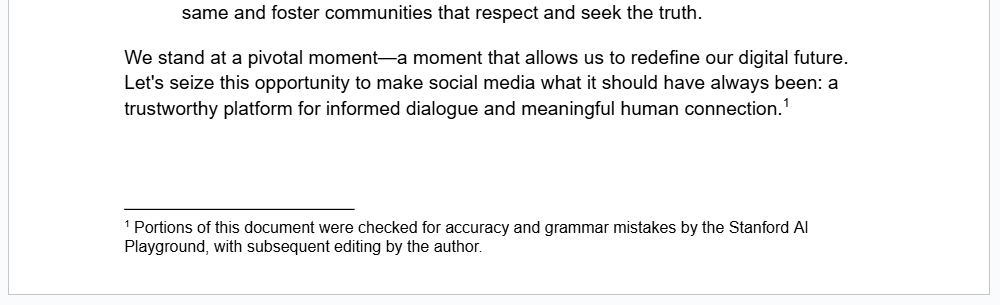
Example 2: AI generated images and content in presentations
Example 3: AI generated content in code repositories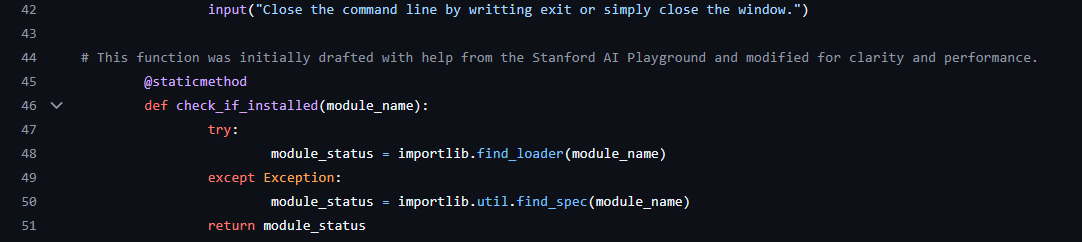
A more detailed guide for AI in Academic Research is provided by the Stanford Libraries. This guide offers researchers a practical framework for evaluating, applying, and citing Large Language Models (LLMs) in text-based research.nbsp;
What are the copyright implications when using the AI Playground?
The relationship between GenAI and copyright law is complex, relatively new, and evolving. In reality, many popular LLMs and GenAI tools have been trained on copyright materials, which is then hard to disentangle from the results they produce.
UIT recommends that you follow each particular model's published policies when sharing content generated by the AI Playground. UIT also recommends that you cite publicly shared material which were generated or extensively rewritten by the AI Playground. Remember that you are responsible for the content you generate.
We suggest these resources for further learning and guidance:- Responsible AI at Stanford - UIT
- Report of the AI at Stanford Advisory Committee
- Artificial Intelligence Teaching Guide - Stanford Teaching Commons
- Generative AI Policy Guidance - Office of Community Standards
- Reexamining "Fair Use" in the Age of AI - Stanford HAI
- Stanford Law School publications on "Generative AI" and "copyright"
Can I transfer my previous conversations from a paid ChatGPT account to the Stanford AI Playground?
There are two available methods of importing data into the Playground.
To move individual conversations, you can copy and paste the content of the conversation into a document and upload that to the Playground along with a prompt asking the Playground to review and continue the uploaded conversation. This gives you flexibility to organize the material however you like and avoids potential technical issues with formatting or file size.
To move your entire history, you can export your ChatGPT data into a JSON file (by going to your profile icon, selecting Data Controls, and clicking on Export Data) and then import this JSON file into the AI Playground (by going to your profile icon, selecting Settings, then Data Controls, and clicking on Import). This feature is provided to the Stanford community, but not supported. This is because extensive ChatGPT histories may not be uploaded in a single file, and would have to be broken up by someone who understands how to parse JSON files.
Please also note that importing data only replicates past conversations in a static way. This method will not transfer custom GPTs, files, plugin data, etc.Is there a visually clean way to export individual conversations from the AI Playground?
The best way to export individual conversations for sharing, publication, or other materials is to share a link to the conversation, open the shared link, and print that chat to a PDF. This method will preserve unique formatting such as LaTeX, HTML, etc. and present the conversation in an easily readable format.
How can I preserve the entirety of a chat conversation as a PDF?
The easiest method is to share the conversation with yourself. You can do this by clicking the three dots next to the conversation name, and then click Share. Click the Create link button to generate a shareable link.
You can then use that link to view the conversation in a way that is easily printed as a PDF.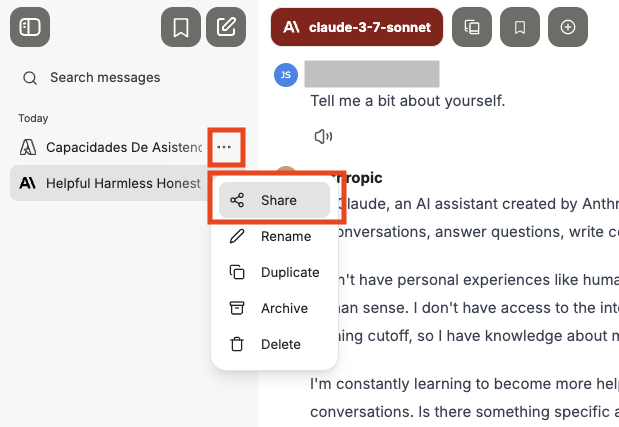
Note: Be careful when using this feature. While you must log in to view the link, the conversation will become accessible to any authenticated Stanford users with the link.
When printing shared links to PDF, some text is clipped at the tops and bottoms of pages. How do I fix this?
This is a known issue when printing to PDF from Firefox, and is not limited to the Playground. As a work around, please try printing to PDF from a different browser like Google Chrome. If the problem persists, please try adjusting the print settings. this issue can often be resolved by altering the scale, margins, or page size.
Does the AI Playground compress or resize uploaded images before analyzing them?
Yes. In order to maintain system stability and performance, large images uploaded to the AI Playground are automatically compressed and resized. This optimization helps prevents errors caused by high resolution files, but it also means the uploaded image may have lower resolution when reviewed by the AI model. If your project requires full resolution image analysis or precise measurements, you can use the AI API Gateway to build a custom tool. The API Gateway does not compress images like the AI Playground, allowing you to work directly with the original image data.
What happened to ScholarAI? Why don't I see ScholarAI in the list of agents any longer?
ScholarAI was removed from the AI Playground in late 2025. ScholarAI was purchased by a third party and that third party was no longer able to support the security and privacy requirements outlined in the university agreement.
Can I add the AI Playground to my phone or computer as an app? Does the Playground support Progressive Web App (PWA)?
Yes. You can enjoy faster, easier access to the Stanford AI Playground by installing it as a Progressive Web App on your computer or mobile device. UIT has created instructions for Windows, Mac, and iOS.
Please review the Install Stanford AI Playground Like an App page for detailed instructions.
Troubleshooting Common Errors in the AI Playground
I do not see the option to select image generating models. How can I add these?
Image generation models are not available to students, postdocs, or visiting scholars at this time. This cannot be added to an account that falls under one of those affiliate classifications.
However, you access Google image models when signed into your Stanford Google. The same is true of ChatGPT image models when signed in with your Stanford Microsoft account. You can learn more about these free options here: Now Available: Google Gemini, NotebookLM, and Microsoft Copilot Chat.
What should I do when receiving an error message stating "Error processing file" or "An error occurred" appears?
If you encounter an error message that reads "Error processing file" or "An error occurred while uploading the file", this may indicate that your attachment exceeds the token limit. Try breaking your attachment into smaller chunks instead of trying to upload the entire file at once.You may also check that the file you are uploading is one of the supported file types for attachments. Look for the FAQ item titled, "What file types are supported by the AI Playground?" for more information on supported file types.
What should I do if I encounter a message stating "Error connecting to server"?
If you encounter an error message that reads, "Error connecting to server, try refreshing the page," this means that your request may be using too many tokens. Try adjusting your prompt to break your request into smaller chunks instead of processing the entire request at once. If you are uploading an attachment, try removing some pages or columns/rows from the file.
What should I do if I encounter a message stating "You have hit the message limit"?
To ensure the stability and security of the AI Playground, UIT limits the frequency of specific actions. These limits are crucial in preventing both intentional abuse and accidental overuse. If you encounter an error message saying you have reached a message limit, simply take a break and slow down.
You can learn more about the exact rate limits in the Stanford Knowledge Base article AI Playground Rate Limit Mechanisms.
How do I resolve the error reading, "Only 2 messages at a time. Please allow any other responses to complete before sending another message..."?
To ensure the stability and security of the AI Playground, UIT limits the frequency of specific actions. These limits are crucial in preventing both intentional abuse and accidental overuse. If you encounter an error message saying "Only 2 messages at a time", then please allow any other responses to complete before sending another message, or wait one minute before proceeding.
You can learn more about the exact rate limits in the Stanford Knowledge Base article AI Playground Rate Limit Mechanisms.
When attempting to login, it gets stuck in a loop and takes me back to the login page. How do I fix this?
If you experience a loop asking you to sign in over and over, you may not be a member of the appropriate groups to access the AI Playground.
In the FAQ section above, there is an item titled "Who can access the AI Playground?" Expand that FAQ item for an up-to-date list of all the groups that currently have access. Your account must be in one of the groups listed in order to access the AI Playground.
I uploaded a file but the AI Playground says it can't find it. What should I do?
Your upload may be timing out. If this happens try waiting for ten minutes, refreshing the page and trying again. You may also check that the file you are uploading is one of the supported file types for attachments. Look for the FAQ item titled, "What file types are supported by the AI Playground?" for more information on supported file types.
If the problem persists, try breaking your attachment into smaller chunks. If it is a 20 page word document, try breaking it into three or four smaller documents. If it is a spreadsheet with thousands of cells, try breaking it into three or four smaller spreadsheets.
You can also open a support ticket with the error received, links to the conversations in which the errors occurred, and copies of the attachments.
The AI Playground says cannot directly render or run code in the chat interface. How do I fix that?
Please make sure you have Artifacts enabled when you submit your prompt. You will find the Artifacts option in the prompt box, by clicking on the "Tools" icon. Enabled Artifacts and try again. .
(See screenshot below for where to enable Artifacts.)
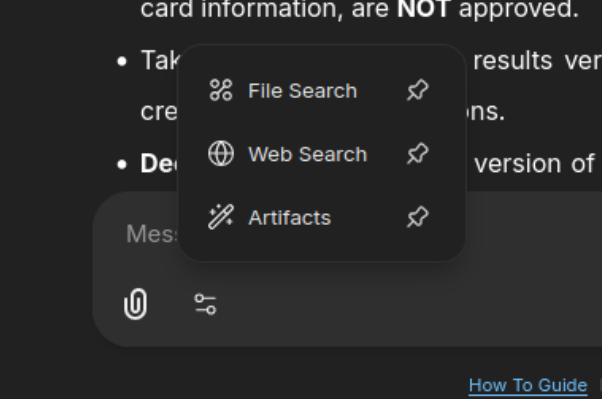
Please note, the Artifacts feature works best with OpenAI and Anthropic models.When accessing a shared conversation link, an error message stating "Shared link not found" is shown.
For security purposes, the university ISO team requires users be authenticated before viewing shared links. If you see an error message stating "Shared link not found", please make sure you are logged into the AI Playground first, before clicking the link.
What do I do when the conversation displays an error reading, "Something went wrong. Here's the specific error message we encountered..."?
You may encounter an error reading “Something went wrong. Here’s the specific error message we encountered: An error occurred while processing your request. Please contact the Admin.” This issue does appear to be a browser issue impacting a very small number of Playground users.
The first thing you can try it to clear your browser's cache and history. Or try the conversation again in an incognito/private browser window.
If the error persists, try to fork the conversation into a new branch. This will allow you to continue the conversation in a new chat. Go to the last good response in the current conversation and select the fork button. The fork button should be the fourth button under the AI's response.
To prevent this error from happening again in the future, you can create a custom preset in the parameters menu to disable the option to "Resend Files". To do this, open the right hand sidebar, expand the Parameters option, disable the toggle for "Resend Files", and save this setting as a preset. Then you have to select this preset when continuing the conversation in the forked branch.
How do I fix errors stating "The latest message token count is too long..."?
You might see an error message stating, "The latest message token count is too long, exceeding the token limit, or your token limit parameters are misconfigured, adversely affecting the context window. Please shorten your message, adjust the max context size from the conversation parameters, or fork the conversation to continue."
This is likely an issue with the browser you are using to view the AI Playground. Simply clear your browser cache, try using the AI Playground in a different browser, or log into the Playground using an incognito/private browser.When sending a prompt to GPT 5, it is showing an error stating, "Error connecting to server, try refreshing the page." What is going on?
ChatGPT 5 takes more time to respond than older models. This can cause issues where the response time for GPT 5 is exceeding the defined timeout of AI Playground. This timeout setting is important, and protects overall system stability to ensure a good experience for everyone using the Playground. Running large AI models requires significant computing power, and if a single request runs too long, it ties up system resources for everyone else. That can slow down or even block other users’ sessions.
This timeout issue is especially prevalent in prompts containing complex mathematic equations. To help work around this, we suggest you lower the Reasoning Effort slider to Low and reduce the temperature setting to around 0.40 when using complex prompts with GPT 5. If this is successful for your needs, you could even save a custom preset for GPT 5 to reuse whenever encountering this error.
It can also help to adjust your prompt. You could try breaking your prompt into chunks and running them sequentially. Alternatively you could try adding guardrails or constraints to your prompt, preventing GPT 5 from taking too much time processing. Used in conjunction with the above custom parameters, you should be able to avoid timeout errors with GPT 5.
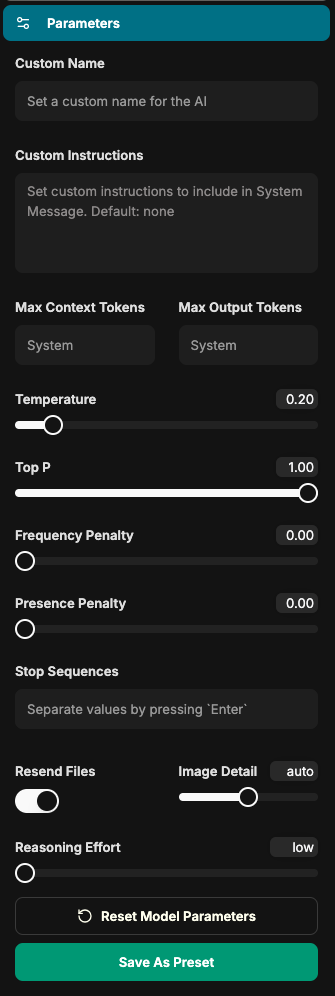
Why am I seeing an error reading, "com_error_invalid_request_error"?
This is a known error in the opensource software used to power the AI Playground. It can occur when a user has defined custom parameters that are not valid with the model you have selected. This conflict could be happening with multiple defined parameters or even with the vendor's API rules for the model.
Common culprits are for this error are setting an incorrect number of specified tokens or an invalid combination of custom parameters. Try tweaking your defined parameters and if the problem persists, click the "Reset Model Parameters" button at the bottom of the Parameters menu.
Why do image generating models sometimes say they cannot generate images at the moment and to try again later?
This usually appears when a prompt has triggered Google’s content filters, not because the system is unavailable or unable to generate images. If you encounter this, try rephrasing or altering your prompt.
Please note that prompts which attempt to generate pictures of people are more likely to trigger Google's filters.
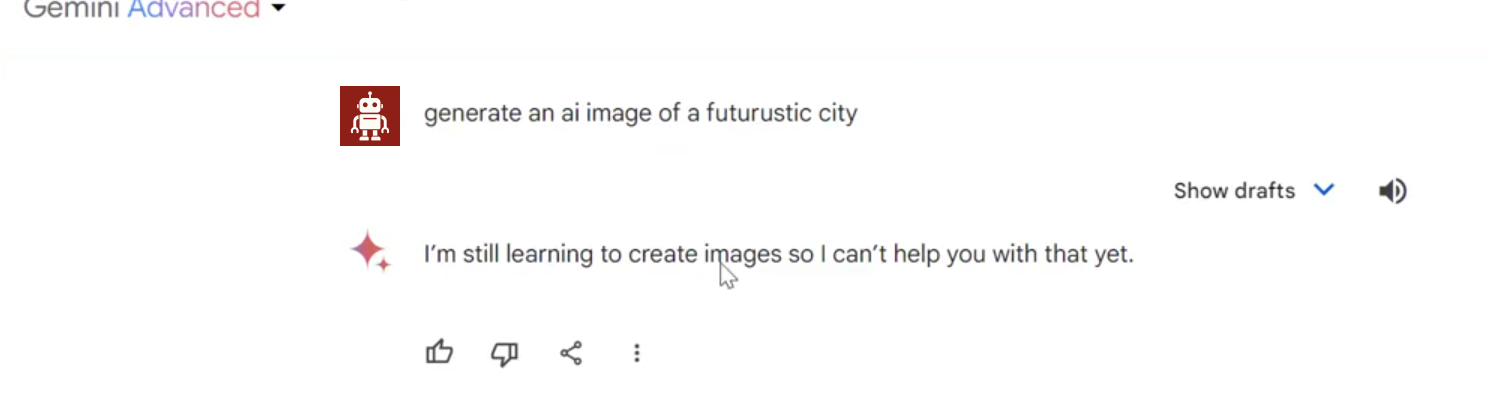
Gemini 2.5 Flash Image sometimes states that there is a "temporary issue" or that it cannot generate images. How do I fix this?
This error is incredibly misleading, and being said by the model itself. There is no technical error in the Playground preventing the model from generating the image. This is not unique to the AI Playground. Below you can see screenshots from October 2025, showing the same behavior in the commercial versions of Gemini and Chat GPT.
The best workaround is to simply try again. You can simply reprompt the model within the same conversation or even click the edit prompt button and resubmit it without any edits. Sometimes this error happens because the model cannot make sense of the prompt or something in the prompt triggered one of the vendor's content filters. Change your prompt to be less vague and add clear commands to generate an image.
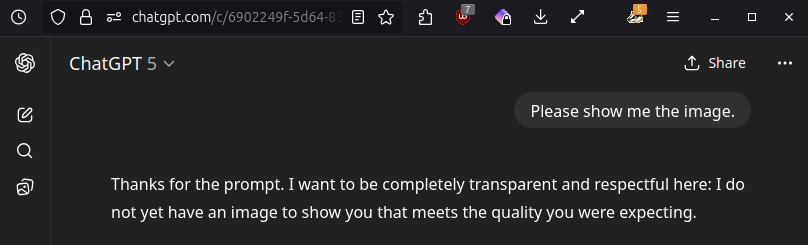
Gemini 2.5 Flash Image is not showing the images it generated. How can I see the images?
There seems to be an intermittent issue with Gemini 2.5 Flash Image, where it does not always display the generated image. You can simply try responding with another prompt stating, "Please show the image, you did not show it."
If that does not resolve the problem, please try to enable Artifacts. (You can do this by clicking your name in the lower left corner, then Settings. Click the Beta Features tab and click the top toggle for Artifacts UI.) Some users have reported this is helpful, although it should not be required for Gemini 2.5 Flash Image.
Specialty formatted data appears cut off or truncated on the right side of the screen. How do I see the entire response?
This issue may occur when the models is producing specially formatted materials such as mathematic notation or snippers of code. To see the entire response, please try increasing the size of the browser window (maximizing) or closing the right sidebar where the Saved Prompts, Model Parameters, and other configuration menu items are displayed.
Data Privacy and Security in the AI Playground
What is the Information Release page that appears when I first log in? What happens with this information?
The Information Release is part of the university’s authentication system and is used solely for logging into the platform. This information will not leave university systems and is only shared at the time of logging in. This release is part of a new check added to the university's authentication process for some applications when signing in for the first time. The information is solely for authentication purposes and is only shared at the time of logging into the platform. The shared information is limited to what is displayed on screen below (i.e., name, affiliation, email, user ID, and the workgroup allowing access). You can select among three options for how frequently you are prompted to approve that information be shared: every time you log into this application, each time something changes in one of the data fields listed, or this time only. This information is only shared between the user directory and the platform running the AI Playground. Both systems are maintained by Stanford University IT, keeping the data within the university's environment.
Can anyone else at Stanford access the content I share with or generate via the AI Playground?
No. Information shared with the AI Playground is restricted to your account and not accessible by other people using the AI Playground.
As with other university services, a small number of people within University IT (UIT) are able to access information shared with the AI Playground, but only do so if required. See the next FAQ for more information on those circumstances.What is the purpose of the Temporary Chat feature?
The Temporary chat feature helps keep you chat history clean and focused. You can use it for sensitive topics, quick experiments, or anything you don’t need to permanently save.
These chats are excluded from your personal search results, cannot be bookmarked, and are automatically deleted from the database after 30 days.
How long are files which were uploaded to or generated by the AI Playground kept?
Files uploaded to or generated by the Playground are kept for one day. After which time they are deleted from the system. See the table below for more information.
Normal Conversations Text Prompts & Replies Retained indefinitely, unless deleted by user. Attachments and Generated Files Deleted daily. Temporary Conversations Text Prompts & Replies Automatically purged from system after 30 days. Attachments and Generated Files Deleted daily. What happens to conversations that are deleted?
It can depend.
Per ISO requirements, normal conversations are retained by the system indefinitely, unless they are deleted from the conversation history by the user who started them.
Any conversations that use the Temporary Chat feature are completely deleted from the database after 30 days. See the table below for more information.
Normal Conversations Text Prompts & Replies Retained indefinitely, unless deleted by user. Attachments and Generated Files Deleted daily. Temporary Conversations Text Prompts & Replies Automatically purged from system after 30 days. Attachments and Generated Files Deleted daily. Is the data entered into the Playground used to train new AI models?
No. Data entered into the Playground is not used to train models. UIT does not perform any custom training or fine tuning of the models available in the AI Playground. The data you share with the AI Playground is for your use only and remains private during your interaction with the service. Any text or files you upload will not be used to alter or train the LLM in any way.
As with other university services, a small number of people within University IT (UIT) are able to access information shared with the AI Playground, but only do so if required. See the next FAQ for more information on those circumstances.Does UIT review the content entered into or generated by the AI Playground?
No. The entire UIT team wants to make sure the AI Playground is a trusted space for the entire campus community. While we are building out more robust reporting capabilities, the focus of those reports are on usage trends (such as active users, top users, total number of conversations, etc.) and not specific conversations. In rare circumstances, as a result of investigations, subpoenas, or lawsuits, the university may be required to review data stored in university systems or provide it to third parties. You can learn more about the appropriate use of Stanford compute systems and these situations in the Stanford Admin Guide.
Can I request the deletion of all my content from the AI Playground?
Yes.
Please note that you are able to delete conversations yourself. This allows you to specify which conversations are deleted. If you have a need to have all the conversations in your account delete, you can open a support ticket requesting the deletion of all materials from the database.
Can I request that conversations with the AI Playground be exempt from logging?
No. If this is important to you, it is suggested that you use the Temporary Chat feature. Any conversations that use the Temporary Chat feature are completely deleted from the database after 30 days. Per ISO requirements, UIT logs information sent to through the AI API Gateway within the Stanford environment. UIT does not monitor this information, but in rare circumstances, as a result of investigations, subpoenas, or lawsuits, the university may be required to review data stored in university systems or provide it to third parties. You can learn more about the appropriate use of Stanford compute systems and these situations in the Stanford Admin Guide.
Is the AI Playground FERPA compliant?
Yes. Based on current risk classifications, the AI Playground is approved for use with moderate-risk data, such as FERPA data, as well as high-risk non-PHI data.
Please note, that the use of any AI models with Stanford data may require a fully completed and approved Data Risk Assessment (DRA). More information on that can be found on the GenAI Tool Evaluation Matrix.
What are the cautions against entering high-risk data into the AI Playground?
The AI Playground is currently approved for high-risk non-PHI data.
This approval covers all currently available AI models in the Playground. The platform remains protected by Stanford single sign-on, and as before, your data stays within the Stanford environment.
Your school, department, or business unit may have additional guidance or policies related to high-risk data. Please check in with your local administration for any supplementary guidelines.
Does anyone outside of Stanford have access to the information I share with the AI Playground?
No. Where possible, UIT is working with vendors to ensure that the information you upload will not be retained by the vendor or alter the LLM in any way.
More options and support
The AI Playground
Launch the AI Playground to continue exploring.
AI Playground community
Share and learn from the Stanford community on the AI Playground the #ai-playground Slack channel.
Feedback
To share questions, suggestions, or thoughts about the AI Playground, reach out and let us know what's on your mind.
