 University IT
OpenAI ChatGPT Edu FAQs
Below is a list of questions and answers for OpenAI ChatGPT Edu.
Using ChatGPT Edu
How do the features of ChatGPT Edu compare to other versions of ChatGPT?
ChatGPT Edu was created specifically for universities, with higher message limits and advanced features like data analytics, web browsing, document summarization, and Codex for software engineering tasks.
ChatGPT Edu Standard is the best option for most eligible users. It offers no cost access to the same models and features as the $20 per month Enterprise plan.
ChatGPT Edu Pro is for users who need higher usage limits. This is a paid offering that is comparable to the $200 per month Enterprise plan.Who is eligible to use ChatGPT Edu at Stanford?
The Standard tier is available to active Stanford faculty, staff, students, and postdocs with an active SUNet ID, at no cost.
There is also an option to access the Standard tier for affiliates who are not eligible for the paid Standard tier. This is available to every SUNet ID that isn't covered in the no cost tier above.
Premium licenses are available to anyone with an active SUNet ID and a valid PTA or student account.
Please see the FAQ item titled "What payment methods are required for the Pro tier?" for more information on the PTA and student account options.
UIT has no control over which affiliations were approved for the no cost Standard tier or how an account's affiliation is listed. If you feel your affiliation is incorrect, please contact UHR or the person sponsoring your account UIT cannot change your affiliation. To access the Standard tier at no cost, a SUNet ID must be a member of one of the following affiliation groups:
stanford:affiliate-fellow
stanford:faculty-active
stanford:faculty-emeritus
stanford:faculty-onleave
stanford:faculty-otherteaching
stanford:staff-academic
stanford:staff-active
stanford:staff-casual
stanford:staffcasual
stanford:staff-emeritus
stanford:staff-onleave
stanford:staff-student
stanford:stafftemp
stanford:staff-temporary
stanford:student-active
stanford:student-onleave
stanford:student-postdocCan I request a shared account or an account for a shared mailbox or service account?
No. OpenAI does not have a concept of shared account in the Education workspace and requires only one user per account, per mailbox. Additionally, the Stanford Information Security team also requires each person requesting an account to attest to the usage agreement for themselves.
What is the difference between the Standard and Premium tiers offered by Stanford University?
Both tiers have access to the same features and models, but the Pro tier has higher usage quotas.
ChatGPT Edu Standard is the best option for most eligible users. It offers no cost access to the same models and features as the $20 per month Enterprise plan.
ChatGPT Edu Pro is for users who need higher usage limits. This is a paid offering that is comparable to the $200 per month Enterprise plan. Pro tier accounts are only available to SUNet IDs and require a valid PTA or student account. (Please see the FAQ item titled "What payment methods are required for the Pro tier?" for more information on the PTA and student account options.) In rare cases where additional usage quotas may be required, the Stanford AI API Gateway is available with unlimited quota thresholds.
OpenAI doesn't publish exact rate limits, as they can vary throughout the day based on overall usage. There are likely different kinds of limits (several hours, daily, weekly, monthly) and University IT does not have visibility into those limits. University IT cannot increase or reset these limits. If a limit is reached, the only path forward is to wait for it to clear.What rate limits, quotas, or thresholds are in place for ChatGPT Edu's Standard and Pro tiers?
OpenAI doesn't publish exact rate limits, as they can vary throughout the day based on overall usage. There are likely different kinds of limits (several hours, daily, weekly, monthly) and University IT does not have visibility into those limits. University IT cannot increase or reset these limits. If a limit is reached, the only path forward is to wait for it to clear. In rare cases where additional usage quotas may be required, the Stanford AI API Gateway is available with unlimited quota thresholds.
You can view your usage in the chatgpt.com website. Click on your profile on bottom left corner, go to Setting, and click on Usage. You should see your current usage and the next reset window listed there. You can also check via the Codex app. In Codex type /status to see OpenAI usage information.
I received a message that I have hit a limit. Can UIT increase my rate limits for ChatGPT Edu?
No. University IT cannot increase or reset these limits. If a limit is reached, the only path forward is to wait for it to clear.
There are many different kinds of limits (several hours, daily, weekly, monthly) and University IT does not have visibility into those limits. But there are some steps you can take to reduce the chances of encountering such limits.
- Avoid using frontier models for every task. Use smaller or older models for more routine and repetitive tasks, reserving the most capable models for more complex work.
- Avoid setting the speed to Fast. Setting the speed to Fast uses two and half times as many tokens as Standard speed.
- Decrease the Effort setting. Higher effort uses more quota more quickly than medium or low effort.
- Avoid unnecessary duplicate runs, especially for long-running or resource-intensive tasks.
For people using the Standard tier, there is an option to upgrade to the Pro tier, which has higher usage thresholds. In rare cases where even more usage may be required, the Stanford AI API Gateway is available with unlimited quota thresholds.
OpenAI sometimes resets usage quotas for Pro and Max accounts. Does that apply to Stanford provided accounts?
No. OpenAI will sometimes post messages on social media saying that quotas will be reset for certain accounts. This reset only apply to individual consumer accounts. The resets do not apply to enterprise or education accounts.
Can I request an account for a shared mailbox or service account?
No. Standard tier accounts are only available to Stanford faculty, staff, students, and postdocs.
Pro tier accounts are only available to SUNet IDs and require a valid PTA or student account.Please see the FAQ item titled "What payment methods are required for the Pro tier?" for more information on the PTA and student account options.
Is this service free for the Stanford community?
There are two tiers.
ChatGPT Edu Standard is the best option for most eligible users. It offers no cost access to the same models and features as the $20 per month Enterprise plan.
ChatGPT Edu Pro is for users who need higher usage limits. This is a paid offering that is comparable to the $200 per month Enterprise plan.Visit the OpenAI Edu Rates webpage to learn more.
How does the Stanford offering compare to what is commercially available from OpenAI?
ChatGPT Edu Standard is the best option for most eligible users. It offers no cost access to the same models and features as the $20 per month Enterprise plan.
ChatGPT Edu Pro is for users who need higher usage limits. This is a paid offering that is comparable to the $200 per month Enterprise plan.OpenAI doesn't publish exact rate limits, as they can vary throughout the day based on overall usage. There are likely different kinds of limits (several hours, daily, weekly, monthly) and University IT does not have visibility into those limits. University IT cannot increase or reset these limits. If a limit is reached, the only path forward is to wait for it to clear.
What is the difference between the Standard and Pro tiers offered by Stanford University?
Both tiers have access to the same features, but the Pro tier has a higher usage quota.
What connectors, plugins, and addons are available?
View the Approved Connectors for AI Services webpage to learn more.
If you would like to use a connector that isn't on the list, please submit a ServiceNow ticket to have the connector reviewed.
Where can I learn more about using connectors and plugins with ChatGPT?
View the Approved Connectors for AI Services webpage to learn what connectors are approved for use with Stanford data. If you would like to use a connector that isn't on the list, please submit a ServiceNow ticket to have the connector reviewed.
Check out this short video on how to use connectors safely and learn even more around the Information Security Office's guidance for connectors and plugs on the Model Context Protocol (MCP) Connectors page.
I am having problems with my existing personal or business account. Can Stanford help me with that account?
The university has no access to or control over your personal account. If you encounter problems with it, you will need to work with the vendor to resolve those issues.
Can our Teams/Enterprise admin be given administrator access to the Stanford service?
No. Administrative access cannot be granted to other groups, even if they have existing accounts outside the Stanford provided service.
I have a personal or business account. Do I have to move to a Stanford account?
No. Per OpenAI documentation, if you do not request access to the Stanford workspace, you will still be able to access your personal account. If you request a Stanford provided account, OpenAI will initiate a migration action for the data in your personal account. This action cannot be canceled once it has started.
If you request access to the Stanford workspace, you do not have to migrate your data, but moving forward you cannot create a new personal account associated with a @stanford.edu email address.
If you currently have a personal account under a @stanford.edu email address and want to migrate that data to a different account, you will need to manually move that data to another account. There isn't an automatic way to migrate data to another personal account. You can recreate custom GPTs in the new account, copy/paste memories from the settings menu, and download then upload conversation data as reference in a new conversation.
If you want to migrate your personal account data to a new Stanford account, please see the FAQ item titled, "How do I migrate my personal ChatGPT account to the new Stanford offering?"
Please note that the use of Stanford data is approved only when accessed through the Stanford-provided account.
I have a personal or business account under an email alias. Am I affected by this change?
This will apply to any variation of a stanford.edu email address including aliases and plus addresses. OpenAI will not allow the creation of new accounts under any @stanford.edu domain.
Per OpenAI documentation, if you do not request access to the Stanford workspace, you will still be able to access your personal account. If you request a Stanford provided account, OpenAI will initiate a migration action for the data in your personal account. This action cannot be canceled once it has started.
See the FAQ item titled, "How do I migrate my personal ChatGPT account to the new Stanford offering?" for more information.
Please note that the use of Stanford data is approved only when accessed through the Stanford provided account.
I have a personal account under a Stanford subdomain like law.stanford.edu or cs.stanford.edu. Will I be forced to migrate to the new service?
No. Existing accounts created under subdomains do not appear to be in scope.
Please note that the use of Stanford data is approved only when accessed through the Stanford-provided account.
I would like to create a personal account under a Stanford.edu email address. Can I do that?
No. OpenAI will not allow the creation of new accounts under the @stanford.edu domain.
Please note that the use of Stanford data is approved only when accessed through the Stanford-provided account.
Is ChatGPT Edu approved for use with sensitive Stanford data?
Yes. Stanford provided ChatGPT Edu accounts are approved for High Risk and PHI data.
Will Codex Cloud, Codex Remote Control, ChatGPT Dots, etc. be available in Stanford's ChatGPT Edu offering?
At this time, beta products like Codex Cloud, Codex Remote Control, ChatGPT Dots, and other beta or experimental products do not meet the requirements for the Stanford agreements and cannot be enabled. Once a product and any perquisites are fully released by OpenAI, it will be reviewed to see if it can be enabled in the Stanford plan.
Am I able to publish material using ChatGPT Sites in Stanford's ChatGPT Edu offering?
No. At this time, the feature is not approved for use with Stanford data by the Information Security Office.
Can I build custom GPTs in ChatGPT Edu?
Yes! You can build custom GPTs for your custom needs and workflows.
Can I share custom GPTs I've built?
No. Due to security and privacy concerns, sharing of agents/GPTs is restricted.
Is ChatGPT Edu suitable for coding projects?
Yes. ChatGPT Edu includes access to Codex, OpenAI's tool designed specifically for software engineering tasks like writing, reviewing, and debugging code.
How do I access OpenAI models through an API?
API usage is not included with this service.
The Stanford AI API Gateway allows for access to numerous models from a list of different AI vendors, and is approved for High Risk data and PHI. The AI API Gateway is a charge back service, which requires a PTA when requesting a key.
Will OpenAI use my inputs to train their models?
No. Stanford has negotiated service agreements to protect Stanford data. OpenAI will not use inputs or outputs from the Stanford provided accounts to train models in any of their products.
Can anyone else at Stanford access the content I share with or generate in the ChatGPT Edu workspace?
No. Information shared within the Stanford provided workspace is restricted to your account and not accessible by other people using the service.
As with other university services, a small number of people within University IT (UIT) are able to access information stored within this system, but only do so if required and with the appropriate approvals. The UIT team does not review the content of conversations. In rare circumstances, such as public safety, the result of investigations, subpoenas, or lawsuits, the university may be required to review data stored in university systems or provide it to third parties. You can learn more about the appropriate use of Stanford compute systems and these situations in the Stanford Admin Guide.
How do I migrate my personal ChatGPT account to the new Stanford offering?
If your personal account uses the @stanford.edu domain, the invitation to the Stanford ChatGPT Edu will trigger the migration process immediately. Please select the "Transfer existing chat history and GPTs” option. Please do not select the export option.
The migration option was specifically designed by OpenAI to automatically transfer your existing personal ChatGPT chat history and GPTs when joining Stanford University workspace. When prompted, select “Transfer existing chat history and GPTs” to begin the data migration process.
The instructions below are shared as an example of how to manually migrate data from an account that is not able to be migrated to the Stanford environment.
- How to copy a chat into your Stanford ChatGPT Edu account
- How to migrate your ChatGPT memory from a personal account to Stanford ChatGPT Edu
- How to move your generated images to your Stanford ChatGPT Edu account
- How to recreate a project and its files in your Stanford ChatGPT Edu account
- How to Migrate an OpenAI Codex Repository from a Personal Account to the ChatGPT Edu Codex
- How to move your Library files to your Stanford ChatGPT Edu account
- How to Migrate Your ChatGPT Scheduled Tasks from a Personal Account to a Stanford Enterprise Account
- How to migrate your custom GPTs from a personal ChatGPT account to the Stanford ChatGPT Edu workspace
If you have questions or problems with your personal account, you would have to work with OpenAI at support@openai.com about the issue. UIT does not have any access to personal accounts created outside of the Stanford provided accounts.
Should I select the "Transfer" option or the "Export" option when moving my personal ChatGPT account to the new Stanford offering?
Please select the option reading, “Transfer existing chat history and GPTs.”
Please do not select the export option. The migration process was specifically designed by OpenAI to support migrating data to the Stanford University environment. Selecting export will likely result in your data being deleted by OpenAI. If you have questions about this, you would have to work with OpenAI at support@openai.com about the issue.
Am I allowed to use the Auto Approval feature in Codex?
Yes. The Auto Approval feature was approved for use in the Stanford environment by the Stanford Information Security Office.
The YOLO approval feature is disabled per the Stanford Information Security Office.The web browser tools say they are unable to fetch information from specific Stanford sites. What sites are blocked?
Below is a list of sites which are blocked for use with the Stanford provided AI tools.
- sequoia.stanford.edu
- fa-exuf-saasfaprod1.fa.ocs.oraclecloud.com
- ofweb.stanford.edu
- axess.stanford.edu
- axess.sahr.stanford.edu
- bi.stanford.edu
- sera.stanford.edu
- ffit.stanford.edu
- fit.stanford.edu
- opacsprd.stanford.edu
- ecertification.stanford.edu
- tableau.stanford.edu
- quicksight-uat.stanford.edu
- quicksight.stanford.edu
- bidpin.stanford.edu
- bidprj.stanford.edu
- bidev2.stanford.edu
- bidev3.stanford.edu
- biupin.stanford.edu
- biuprj.stanford.edu
- biipin.stanford.edu
- biint2.stanford.edu
- biuat4.stanford.edu
- *.console.aws.amazon.com
- console.cloud.google.com
- cloud.oracle.com
- sera-dev.stanford.edu
- sera-int.stanford.edu
- sera-uat.stanford.edu
- sera-fix.stanford.edu
- sera-tch.stanford.edu
- apply.stanford.edu
- sta.test.technolutions.net
- of1fix.stanford.edu
- applygrad.stanford.edu/manage
- applygrad.stanford.edu/manage/reader
- adminuat.dc4.pageuppeople.com
- stanford.dc4.pageuppeople.com
- home.interfolio.com
- mathjobs.com
- econjobmarket.org
- fasa.stanford.edu
- fasa-uat4.stanford.edu
admin.enterprise.givegab.com
alumnidirectory.stanford.edu
alumnidirectoryexport.stanford.edu
app.cvent.com
app.orbiit.ai
card.stanford.edu
corral.stanford.edu
dev--adapt-directory.netlify.app
dev--adapt-honor-rolls.netlify.app
experience.adobe.com
givegabreports.stanford.edu
givinghistory.stanford.edu
goreporting-dev.stanfor.d.edu
goreporting-dev.stanford.edu
goreporting-poc.stanfor.d.edu
goreporting-psdev.stanfor.d.edu
goreporting-pssit.stanfor.d.edu
goreporting-psuat.stanfor.d.edu
goreporting-psuat.stanford.edu
goreporting-uat.stanford.edu
goreporting.stanfor.d.edu
goreporting.stanford.edu
gre-dev.stanford.edu
gre-poc.stanford.edu
gre-psdev.stanford.edu
gre-psuat.stanford.edu
gre-uat.stanford.edu
gre.stanford.edu
groups-uat.stanford.edu
groups.stanford.edu
honorrolls.stanford.edu
marketo.stanford.edu
myaccount.stanford.edu
ogp-dev.stanford.edu
ogp-poc.stanford.edu
ogp-psdev.stanford.edu
ogp-pssit.stanford.edu
ogp-psuat.stanford.edu
ogp-uat.stanford.edu
ogp.stanford.edu
ogp.stanforfd.edu
oodhub-dev.stanford.edu
oodhub-fix2.stanford.edu
oodhub-poc.stanford.edu
oodhub-psdev.stanford.edu
oodhub-pssit.stanford.edu
oodhub-psuat.stanford.edu
oodhub-sit2.stanford.edu
oodhub-uat.stanford.edu
oodhub.stanford.edu
oodpta-dev.stanford.edu
oodpta-poc.stanford.edu
oodpta-psdev.stanford.edu
oodpta-psuat.stanford.edu
oodpta.stanford.edu
oodsaadocs-dev.stanford.edu
oodsaadocs-uat.stanford.edu
oodsaadocs.stanford.edu
preview--adapt-honor-rolls.netlify.app
preview-honorrolls.stanford.edu
psapp-dev.stanford.edu
psapp-poc.stanford.edu
psapp-psdev.stanford.edu
psapp-psuat.stanford.edu
psapp-uat.stanford.edu
psapp.stanford.edu
runtransfers-dev.stanford.edu
runtransfers-poc.stanford.edu
runtransfers-psdev.stanford.edu
runtransfers-psuat.stanford.edu
runtransfers-uat.stanford.edu
runtransfers.stanford.edu
saafilemaker-uat.stanford.edu
saafilemaker.stanford.edu
spotsearch-dev.stanford.edu
spotsearch-poc.stanford.edu
spotsearch-psdev.stanford.edu
spotsearch-psuat.stanford.edu
spotsearch-uat.stanford.edu
spotsearch.stanford.edu
stampoutput-dev.stanford.edu
stampoutput-poc.stanford.edu
stampoutput-psdev.stanford.edu
stampoutput-psuat.stanford.edu
stampoutput-uat.stanford.edu
stampoutput.stanford.edu
stanford-c.sandbox.us.hivebrite.com
stanfordcard--carddev.sandbox.my.salesforce.com
stanfordcard--lesson.sandbox.my.salesforce.com
stanfordcard--psdev.sandbox.my.salesforce.com
stanfordcard--pssit.sandbox.my.salesforce.com
stanfordcard--psuat.sandbox.lightning.force.com
stanfordcard--sit.sandbox.my.salesforce.com
stanfordcard--uat.sandbox.lightning.force.com
stanfordcard.lightning.force.com
stanfordoga--dev.sandbox.my.salesforce.com
stanfordoga--uat.sandbox.my.salesforce.com
stanfordoga.my.salesforce.com
uat--adapt-myaccount.netlify.app
ucomm-marketo.stanford.edu
unsubscribe-dev.stanford.edu
unsubscribe-poc.stanford.edu
unsubscribe-psdev.stanford.edu
unsubscribe-psuat.stanford.edu
unsubscribe-uat.stanford.edu
unsubscribe.stanford.edu
I upgraded from ChatGPT Edu Standard to Pro. Why is Pro showing as a separate workspace from the Standard tier?
This is expected behavior. Stanford’s ChatGPT Edu Standard and Pro tiers are provided through separate OpenAI workspaces. When you purchase a Pro license, your existing Standard workspace is not converted or upgraded in place. Instead, you are given access to a separate Stanford University Pro (Edu) workspace.
OpenAI does not currently provide a supported method to merge the Stanford workspaces or automatically migrate data between them. UIT has created instructions for how to manually migrate data between tenants. Those can be found under the FAQ item above titled, "How do I migrate my personal ChatGPT account to the new Stanford offering?"
To switch workspaces in Codex, you have to log out and log in again. The choice of workspace should be shown to you when you login.
Can I share Projects with other people at Standford?
Yes. You are able to share Projects with individuals who have a Stanford ChatGPT Edu account. There are two important things to note about sharing Projects.
1) Projects can be shared with people on the same tier as you. While Project sharing is available to both Standard tier and Pro tier accounts, people with a Standard tier license cannot share Project with people on a Pro tier license. The opposite is also true.
2) ChatGPT Projects that contain "Work" conversations, cannot be shared. If you need to share Projects with other users, those Projects should only contain "Chat" conversations. If you have added a "Work" conversation to a Project, you will need to remove it from the Project before sharing.
What is happening to the Custom GPTs in ChatGPT?
OpenAI plans to transition away from Custom GPTs in favor of Plugins. The transition is currently expected to begin in December 2026 or later, although OpenAI has not yet provided Stanford with a final transition plan or timeline.
If you are creating a new custom experience in ChatGPT Edu, we recommend building a Plugin rather than a new Custom GPT. Existing Custom GPT owners can also begin preparing for the transition. OpenAI has created a short video explaining how to migrate a Custom GPT to a Plugin: Migrating a custom GPT to a plugin
Additional information will be added to this page as OpenAI provides details about the transition process and any actions Stanford users may need to take.
Is Stanford impacted by the usage reduction announced by OpenAI in September 2026?
Unfortunately, the OpenAI team has confirmed that the changes to Pro tier plans announced during their recent DevDay do apply to Stanford ChatGPT Edu accounts. These changes include reduced usage limits to Stanford’s ChatGPT Edu Pro accounts. As part of this change, the included usage allowance for Edu Pro accounts has been reduced. In addition to the overall reduction in usage allowances, Stanford users who had already consumed 50% or more of their weekly allowance saw their remaining allowance reduced to zero.
We recognize that this is a significant change, particularly for heavier Codex users. University IT is working with OpenAI on additional credits for the Stanford environment to reduce the overall impact of this change.
Additional information will be added to this page, as well as the #cop-ai channel in Slack, as the arrangement is finalized.
Billing
How will billing work in the new ChatGPT Edu plan?
There are two tiers:
- Standard: Free to students, postdocs, faculty, and staff, and is equivalent to OpenAI's $20 per month plan.
- Pro: Has a monthly charge that requires a PTA or student account and is equivalent to OpenAI's $200 per month plan.
Please see the FAQ item titled "What payment methods are required for the Pro tier?" for more information on the PTA and student account options.
You can use the Get CharGPT Edu Pro link on the service Claude for Education service page to purchase a Pro tier account.
What happens if I lose access to my SUNet ID?
Access is dependent on a functional SUNet ID. If your SUNet is suspended, deactivated, or moves into the Grace period, access to this service would be lost and information may be deleted.
Can I get a refund for my personal subscription when I migrate to the university offering?
If you had a paid, individual subscription under the @stanford.edu domain, you may be eligible for a prorated refund from OpenAI.
You will need to work directly with OpenAI support for refunds. More information can be found on their support page, How can I cancel my ChatGPT subscription once I have migrated to ChatGPT Enterprise or reach out to support@openai.com.
What payment methods are required for the Pro tier?
A valid PTA or student account is required to purchase the Pro tier. STAP funds and Pcards cannot be used for this upgrade.
You can learn more about PTAs on Stanford's Admin Guide 3.1.3 Expenditure Accounts (PTAs) or through Stanford's Fingate page about PTA Manager system. The UIT AI Team will not be able to help you find or create a PTA.
A “student account” refers to an account through which a student receives a Stanford tuition bill through the central Student Financial Services (SFS) office. Non-degree students, would not have an eligible “student account” under that definition.
Do I always need to provide PTA billing information for the Pro tier?
A valid PTA or student account is required to purchase the Pro tier. STAP funds and Pcards cannot be used for this upgrade.
You can learn more about PTAs on Stanford's Admin Guide 3.1.3 Expenditure Accounts (PTAs) or through Stanford's Fingate page about PTA Manager system. The UIT AI Team will not be able to help you find or create a PTA.
A “student account” refers to an account through which a student receives a Stanford tuition bill through the central Student Financial Services (SFS) office. Non-degree students, would not have an eligible “student account” under that definition.
What does "Project Task Award" refer to on the Add ChatGPT Edu Premium form?
A PTA is a method of labeling and tracking expenditure accounts in the university's financial systems. It consists of three segments: Project (P), Task (T), and Award (A), which help organize and allocate funds for various academic and research initiatives. You enter the corresponding sections into the fields in the request form.

(In the above example, let's use the fake PTA 5555555-000-APIGW. The first section of the PTA is the project, the second is the task, and the last is the award.)
You can learn more about PTAs on Stanford's Admin Guide 3.1.3 Expenditure Accounts (PTAs) or through Stanford's Fingate page about PTA Manager system. The UIT AI Team will not be able to help you find or create a PTA.
Why are the listed approvers for the PTA not correct?
They are correct. What you are seeing is expected behavior. The approver list for UIT billable services may be different than those listed in the PTA authority or other systems.
The UIT Billable system prioritizes the lower ORG level first. A user with access to a top level org code, would need to request the UIT Billable Service Approver (University) privilege under the specific ORG code to be included in the approvers list. The approvers you see listed when filling out the request form, will have the "UIT Billable Service Approver" role in Authority Manager for the lower ORG code.
Please see the How to Request Authority for Ordering and Reporting page for more information.
Troubleshooting
When trying to sign into my Stanford provided account, I receive an error that the workspace does not exist.
This is likely a browser caching issue. Please try the steps below:
Open an incognito/private browser window
Go to chatgpt.com and click "Log in"
Type in your email (SUNet@stanford.edu) and click "Continue"
On the next screen, type in your email (SUNet@stanford.edu) and go through the Stanford login process.That should allow you to log into your Stanford provided account.
I receive an error reading "failed to read configuration layers:" when trying to sign into the Codex app on a Mac.
The full error reads, "failed to read configuration layers: Your access token could not be refreshed. Please log out and sign in again."
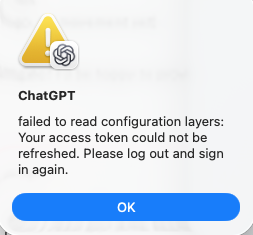
This error is likely due to a corrupt authentication token on your Mac. If you have administrator access on your Mac, please try the steps below. If you do not have administrator access, please work with your local IT team.
Close the Codex app
In a terminal session run, "rm -f ~/.codex/config.toml ~/.codex/auth.json"
Relaunch app.You may have to adjust the path in the above command, if you have installed the Codex app in a different folder.
