 University IT
Claude VS Code Setup With AI API Gateway
On this page:
Prerequisites
Required Software
| Software | Minimum Version | Download Link |
|---|---|---|
| Visual Studio Code | 1.93+ (recommended) | https://code.visualstudio.com/download |
| Claude Code (VS Code Extension) | Latest | VS Code Extensions Marketplace |
| Git (optional) | 2.0+ | https://git-scm.com/downloads |
System Requirements
| Requirement | Claude Code |
|---|---|
| OS | Windows / macOS / Linux |
| RAM | 4GB+ recommended |
| Disk Space | ~100MB (extension + cache) |
| Internet | Required for API calls |
AI API Gateway details / API Key
- Base URL:
https://aiapi-prod.stanford.edu(or your environment's gateway URL) - API Key: Your own AI API key (provided via secure email)
Installation
- Open VS Code
- Open Extensions panel: ⌘/Ctrl + Shift + X
- Search for "Claude Code"
- Click Install
- Restart VS Code if prompted
AI API Gateway configuration: Claude Code
Claude Code uses environment variables for gateway routing. Configure these via a global config file.
Step 1 — Create Claude Code Global Config Folder (if needed)
If you already have Claude Code configured, you may skip this.
shell
mkdir -p ~/.claudeStep 2 — Create/Update Settings File
Edit:
shell
vi ~/.claude/settings.json
Paste (replace placeholders):
shell
vi ~/.claude/settings.json
	> insert mode
	> paste the below json (save the settings.json)
{
	"$schema":
"https://json.schemastore.org/claude-code-settings.json",
	"env": {
		"ANTHROPIC_BASE_URL": "https://aiapi-prod.stanford.edu",
		"ANTHROPIC_AUTH_TOKEN": "YOUR_AIAPI_KEY",
		"CLAUDE_CODE_DISABLE_EXPERIMENTAL_BETAS": "1",
		"DISABLE_PROMPT_CACHING": "1"
	}
}
Step 3 — Verify File Contents
shell
vi ~/.claude/settings.jsonNotes:
- The flags help avoid errors related to anthropic-beta headers and prompt caching behavior.
Configuration: VS Code
Step 1 — Install Claude Code Extension
- Install from VS Code Extensions Marketplace
Step 2 — Disable Login Prompt
Open:
- Command Palette → Preferences: Open User Settings (JSON)
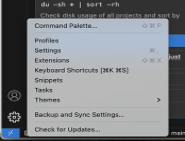
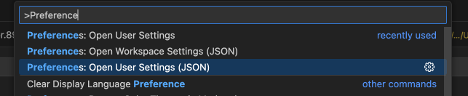
Add:
shell
{
	"claudeCode.disableLoginPrompt": true
}
Step 3 — Force Model Name (must match gateway alias)
In the same settings JSON, set the model:
shell
{
	"claudeCode.disableLoginPrompt": true,
	"claudeCode.selectedModel":
	"claude-4-sonnet/claude-opus-4-6"//Choose from the Available models.
}
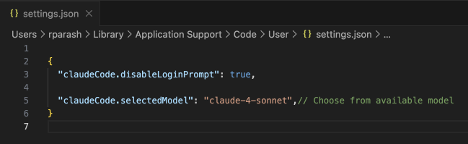
Use a model name that exists in your AI API Gateway's /models list (see Section 5).
Step 4 — Fully Restart VS Code
Quit VS Code completely and reopen it (restart is required for settings/env to apply reliably).
Configuration fields explained
| Field | Description |
|---|---|
| ANTHROPIC_BASE_URL | AI API Gateway base endpoint (e.g., https://aiapi-prod.stanford.edu/v1) |
| ANTHROPIC_AUTH_TOKEN | Your AI API key |
| claudeCode.disableLoginPrompt | Prevents the extension from prompting interactive login |
| claudeCode.selectedModel | Forces the model alias used by the extension (must match gateway model name) |
CLAUDE_CODE_DISABLE_EXPERIMENTAL_BETAS | Prevents experimental/beta headers that may cause gateway incompatibilities |
DISABLE_PROMPT_CACHING | Prevents prompt caching behavior/header usage that can error on some gateways |
Model Information / Model Alias Notes
Claude Code requires the selected model name to match a valid gateway model alias.
To confirm available model aliases:
shell
curl -s https://aiapi-prod.stanford.edu/v1/models \
-H "Authorization: Bearer YOUR_AIAPI_KEY"- Confirm your chosen alias (example:
claude-opus-4-6) is present. - If you see "invalid model" errors, update
claudeCode.selectedModelto a valid alias.
Advanced Options / Recommended Flags
Recommended in ~/.claude/settings.json:
CLAUDE_CODE_DISABLE_EXPERIMENTAL_BETAS=1DISABLE_PROMPT_CACHING=1
Purpose:
- Reduces the chance of gateway errors related to unsupported headers/behaviors.
Validation (Test Cases)
Run the following inside the Claude Code panel in VS Code.
Test Case 1 — Basic Connectivity
Input:
Say OK
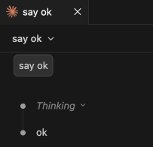
Expected:
- Normal response
- No login prompt
- No 401/403 errors
- No anthropic-beta header errors
Test Case 2 — Model Verification
Input:
What model are you using?
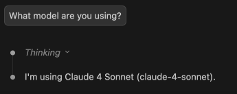
Expected:
- Responds normally
- No "invalid model" error
Test Case 3 — Code Generation Test
Create a new file called test.js, then ask:
Write a simple Node.js Express server that returns Hello World.
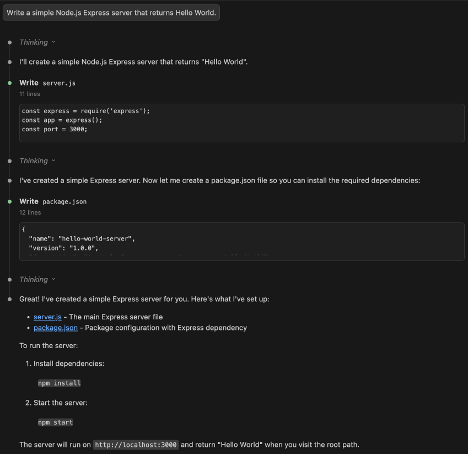
Expected:
- Valid Express server code
- No API / gateway errors
Test Case 4 — Multi-line Response Test
Input:
Explain how REST APIs work in 5 bullet points.
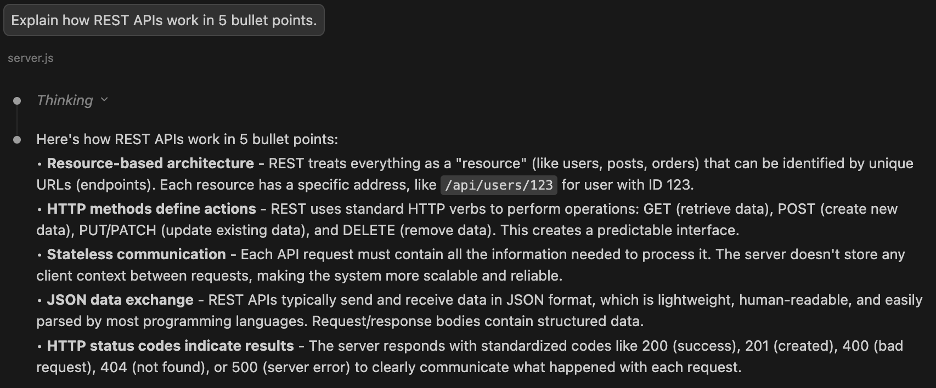
Expected:
- Proper formatting
- No truncation/timeouts
Test Case 5 — Large Prompt Test
Paste a longer paragraph (10–20 lines) and ask:
Summarize this.
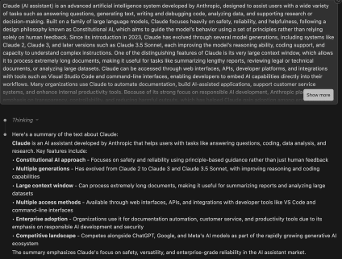
Expected:
- Summary returned
- No prompt-caching or anthropic-beta header errors
Troubleshooting / Common Errors
- 401/403 (Unauthorized/Forbidden)
- API key missing/incorrect in
ANTHROPIC_AUTH_TOKEN - Gateway key not valid for the environment
- API key missing/incorrect in
- Invalid model / model mismatch
claudeCode.selectedModeldoes not match a gateway alias- Validate via
GET /models(Section 5)
- Login prompt still appears
- Confirm
claudeCode.disableLoginPrompt: true - Fully restart VS Code
- Confirm
- Header-related gateway errors (anthropic-beta / prompt caching)
- Ensure these are set in
~/.claude/settings.json:CLAUDE_CODE_DISABLE_EXPERIMENTAL_BETAS=1DISABLE_PROMPT_CACHING=1
- Ensure these are set in
