University IT
Coming Soon: Email Warning Tags
This April, you may notice warning tags on some emails. These visual indicators provide additional context for messages and alert you to use caution when responding to or acting on potentially dangerous emails.
How email warning tags work
Email is a primary method for cyberattacks targeting organizations. Email warning tags enhance email security by alerting email recipients to potential risks. They can help identify phishing attempts and encourage a careful approach to suspicious messages.
These tags are rare and will only apply to incoming emails. They won’t prevent you from opening emails, downloading attachments, or clicking links, but we urge you to proceed with caution.
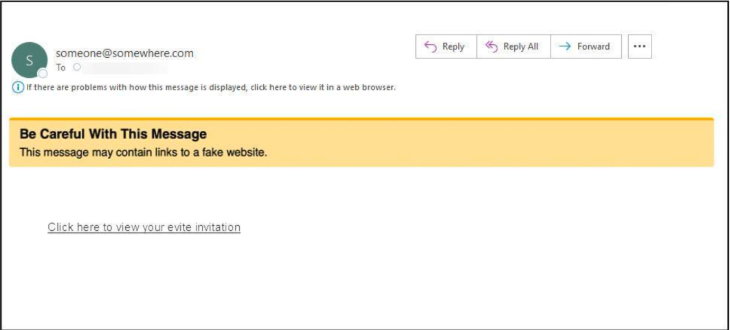
What to do if you see a warning tag
If you see a warning tag, take a moment to review the message before taking action:
- Check the sender. Make sure the email address matches who you expect to hear from. Be wary when receiving emails that look like they’re from members of the Stanford community, but are sent from personal-looking email accounts.
- Exercise caution with links and attachments. Avoid clicking links or downloading files unless you’re confident the message is legitimate.
- Pause if something seems unusual. If the message feels unexpected or suspicious, verify it through another method or report it.
- Use the Report Phishing button. If you suspect a phishing attempt, use the Report Phishing button in Outlook or forward the email to phishing@stanford.edu.
Additional resources
- Questions? Submit a Help request.
- View the Email Warning Tags webpage.
- No warning tag doesn’t always mean an email is safe. Visit the Stay Safe From Phishing Scams guide to learn how to recognize, report, and stay vigilant.
DISCLAIMER: UIT News is accurate on the publication date. We do not update information in past news items. We do make every effort to keep our service information pages up-to-date. Please search our service pages at uit.stanford.edu/search.
What to read next:

Action Required: Upcoming Upgrades and Changes to Stanford VPN
Google Drive Files Become Unavailable 180 Days After Owner’s Account Is Suspended