Tech Talk - Gemini Series: AI in Practice
Creativity in the Age of AI


Explore practical ways to use Gemini Enterprise for everyday work, from daily briefings and secure search to building AI agents and automated workflows. Each session includes hands-on exercises. To follow along, please log into your Gemini Enterprise account (https://aiworkspace.stanford.edu) before your session.
 
This four-part webinar series offers a comprehensive introduction to Gemini Enterprise, taking participants from foundational concepts to practical applications. Across four hands-on sessions, participants will build skills in everyday AI use, secure enterprise search, and creating agents and automated workflows.
 
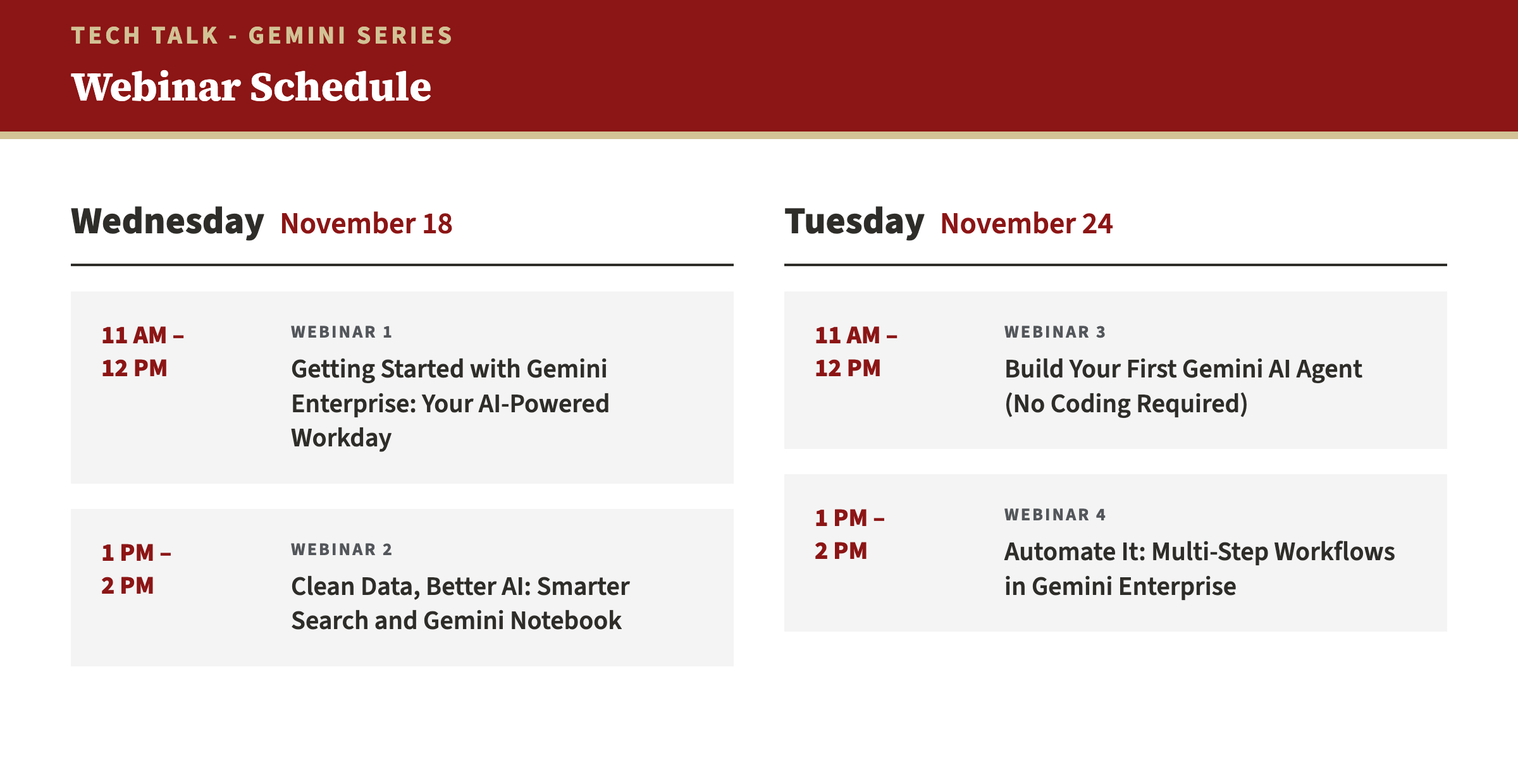
Schedule

  
  register


Webinar Icon Webinar 1: Getting Started with Gemini Enterprise: Your AI-Powered Workday
 
In an environment where professionals are asked to do more with limited time, constant demands, and growing complexity, this workshop offers a practical approach to working with greater clarity, effectiveness, and ease. Modern university workflows are spread across many tools and busy inboxes. This session introduces Gemini Enterprise as a permission-aware hub for daily operations and shows how it differs from consumer AI tools. Connect Outlook and other tools to try morning briefings, email triage, and task extraction, then use @FileName to draft replies from meeting notes and project threads.
 
Objectives
  • Compare consumer AI with permission-aware Gemini Enterprise
  • Practice zero-shot, one-shot, and format-specific prompts
  • Use Gemini Enterprise to support daily admin routines and inbox triage
 
Webinar Icon Webinar 2: Clean Data, Better AI: Smarter Search and Gemini Notebook
The quality of generative AI results depends on the data it can access. Gemini Enterprise surfaces files based on existing permissions, so messy folders, outdated drafts, and overshared links can skew results or expose information to the wrong people. This session covers how to structure repositories and review permissions across Google Workspace and Microsoft 365, and how to build source-grounded research environments in Gemini Notebook. Try Drive search operators to find widely shared files, compare cluttered and structured folders, and check Notebook claims with click-through citations.
 
Objectives
  • Explain the basics of RAG and how data organization affects AI retrieval
  • Review file access with advanced search operators and apply naming conventions that support enterprise search
  • Compare when to use Gemini Notebook (focused source analysis) and Gemini Enterprise (general discovery)
 
Webinar Icon Webinar 3: Build Your First Gemini AI Agent (No Coding Required)
Gemini Enterprise’s Workflow Builder lets non-technical staff and faculty create conversational Chat Agents and structured Workflows using natural language. This session introduces the shift from single-turn chat to agents, plus the “Operating Manual Framework” for setting guardrails. Build a sample brand communications assistant grounded in style documentation, then outline and test an executive assistant agent in the Preview tab.
 
Objectives
  • Explain how goal-oriented, tool-using agents differ from basic chatbots
  • Build conversational agents from natural language descriptions
  • Write Operating Manuals with clear constraints to guide agent behavior
 
Webinar Icon Webinar 4: Automate It: Multi-Step Workflows in Gemini Enterprise
Some institutional tasks need more than a single prompt. This session covers building multi-step workflows in Workflow Builder, including triggers that start a workflow when a file, such as a financial report export, lands in a Google Drive folder. A restricted Gemini Agent then processes data across Drive and M365. Set up a folder-based trigger, simulate a run, and have the agent flag budget variances and update tracking documents.
 
Objectives
  • Design a multi-step workflow on a visual canvas
  • Configure event-based triggers, such as Google Drive file events, for recurring back-office tasks
  • Limit an agent’s access to specific folders for targeted document analysis


  register


Custom training workshops are available for this program

Technology training sessions structured around individual or group learning objectives. Learn more about custom training

Special Group Rates

For groups of 5 or more within the same team or department, special rates are available. Please contact techtraining@stanford.edu for more details.


University IT Technology Training sessions are available to a wide range of participants, including Stanford University staff, faculty, students, and employees of Stanford Hospitals & Clinics, such as Stanford Health Care, Stanford Health Care Tri-Valley, Stanford Medicine Partners, and Stanford Medicine Children's Health.

Additionally, some of these programs are open to interested individuals not affiliated with Stanford, allowing for broader community engagement and learning opportunities.