University IT
Update Zoom to the Latest Version
Zoom has released an important security update to address a critical software vulnerability that affects computers and mobile devices.
What to do
If your computer is managed by Stanford’s computer management service (Jamf or BigFix)
The Zoom software will be updated automatically. If you see an on-screen notification indicating an application restart is necessary to complete the update, please take the necessary action; do not defer the update.
If you use Zoom on your smartphone or tablet
Open the App Store (iOS and iPadOS) or Google Play Store (Android), search for Zoom, and update to the latest version.
If your computer isn’t managed by Stanford
If your computer is not managed by Stanford’s computer management services, or you are unsure, please follow these instructions as soon as possible:
- Open the Zoom Workplace app on your computer.
Click your profile picture, then select Check for Updates.
Note: If you do not see the "Check for Updates" menu item, your computer is managed by Stanford, and Zoom will be updated automatically.
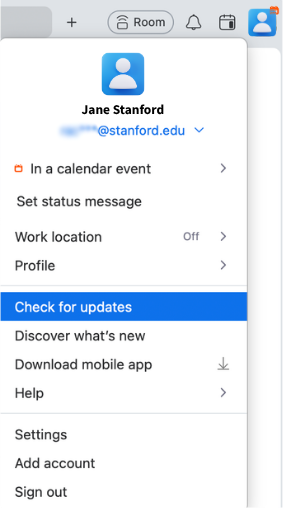
- Zoom will download and install the latest version.
- A pop-up window will confirm when your update is complete, and the application will restart automatically. (If no update is available, you’re using the latest version.)
Can’t update right away?
If you’re unable to update immediately, you can use the Zoom web app (https://stanford.zoom.us/) as an alternative to join or host a meeting.
Additional resources
- Need help? Submit a Help request to the Stanford Zoom team.
- For more about updating Zoom, go to Zoom’s support page.
- Visit the Zoom service page on the University IT website for more about Zoom video conferencing at Stanford.
- Join the Stanford Zoom users’ Community of Practice Slack channel (#cop-zoom-users) to ask questions and connect with other Zoom users.
DISCLAIMER: UIT News is accurate on the publication date. We do not update information in past news items. We do make every effort to keep our service information pages up-to-date. Please search our service pages at uit.stanford.edu/search.
What to read next:

Action Required: Upcoming Upgrades and Changes to Stanford VPN
Google Drive Files Become Unavailable 180 Days After Owner’s Account Is Suspended