University IT
Prepare for Sequoia's July 6 Launch
Now is the time to make sure you’re prepared for the July 6 launch of Stanford's new HR and payroll system, Sequoia.
Before Sequoia launches, there are some important things you can learn and do to be prepared. (See also: Six ways to prepare for Sequoia before July 6 on the Cardinal at Work site.)
What to do
These are actions you can take to help you prepare for a successful start with Sequoia:
- (Now) Bookmark Sequoia: Save sequoia.stanford.edu so you can easily access our new HR and Payroll system when it goes live on July 6.
- (Now) Complete Sequoia training: Self-paced, interactive training resources are available to help you prepare. Find recommended training based on your role.
- By June 26 (5 p.m. PT), enter and approve time card entries for the pay period ending June 30.
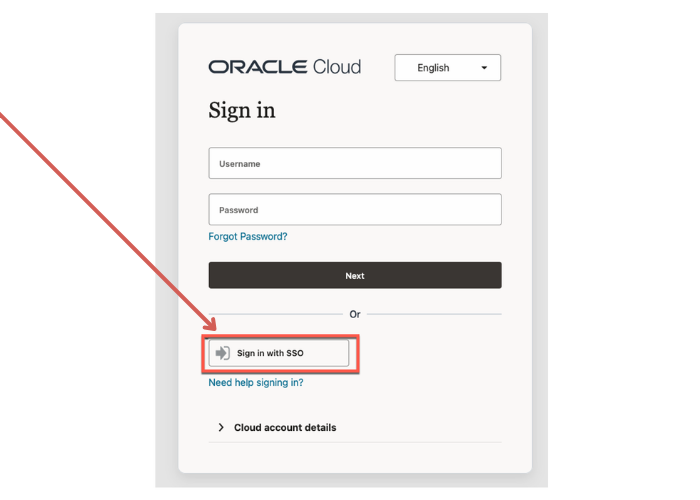
- Starting July 6, when logging into Sequoia, choose the ‘Sign in with SSO’ link if you have a SUNet ID (skipping past “Username and Password” fields). The username and password fields are for those who need access to Sequoia without a SUNet ID.
What to know
Get familiar with the changes and improvements Sequoia will bring:
- System outage dates and payroll deadlines before July 6: Several systems you might typically use, including Axess, will have limited functionality or planned downtime as Stanford prepares for Sequoia’s launch.
- What’s changing with Sequoia: After Sequoia launches, Axess will still be available, but most HR and payroll functions will move to Sequoia.
- How to submit your time card and record time away in Sequoia: Time entry in Sequoia will look and feel different than the current experience in Axess.
Find help
If you have questions, please use these resources by University Human Resources (UHR) and Financial Management Services (FMS):
- Browse the Services & Support portal for guidance related to Sequoia, benefits, leaves, I-9s, and more. You can browse various topic areas to review help articles or submit the appropriate HR Service Center request form for your inquiry. New help articles and resources will continue to be added ahead of go-live.
- For time card, absence, and payroll questions, submit a request through the Financial Support Center.
Both UHR and FMS centers are working together to support the full range of Sequoia functionality.
Learn more
- Meet Sequoia (on the Cardinal at Work site)
- Key Dates to Know for Sequoia’s July 6 Launch
DISCLAIMER: UIT News is accurate on the publication date. We do not update information in past news items. We do make every effort to keep our service information pages up-to-date. Please search our service pages at uit.stanford.edu/search.
What to read next:

Action Required: Upcoming Upgrades and Changes to Stanford VPN
Google Drive Files Become Unavailable 180 Days After Owner’s Account Is Suspended