University IT
Notice a New Login Screen in Webmail? Here’s Why
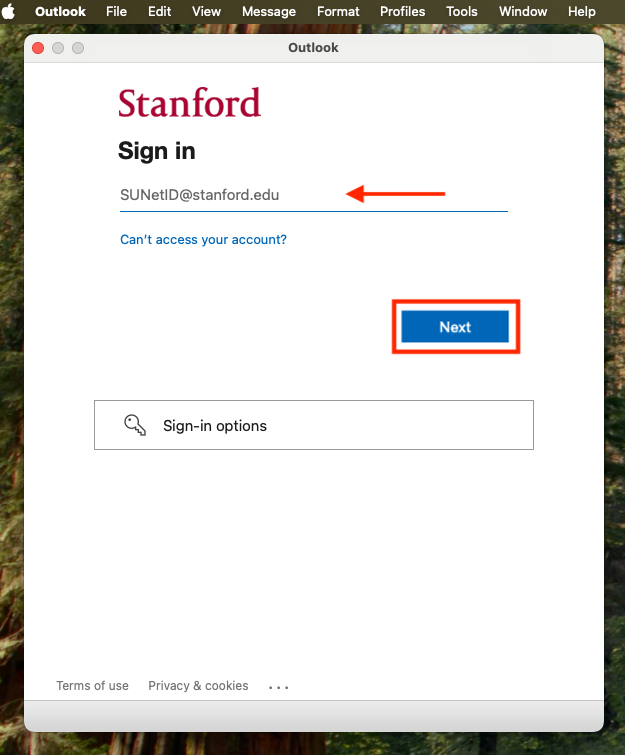
When you log into Outlook at webmail.stanford.edu — or certain other university Microsoft apps and websites — you may see a new Stanford University login screen.
- All you need to do is enter your university email address (your SUNetID@stanford.edu) and select Next.
- You'll then continue through your usual Stanford sign-in process.
Why am I seeing this?
This screen is part of the new Microsoft login rollout, which is currently underway in the School of Medicine.
- If you’re a School of Medicine community member who has already set up your new login, you’ll use your new Microsoft authentication method to view your university email.
- Otherwise, you'll continue through the traditional Stanford login.
This screen is temporary. Expect your login experience to be streamlined in the coming months.
DISCLAIMER: UIT News is accurate on the publication date. We do not update information in past news items. We do make every effort to keep our service information pages up-to-date. Please search our service pages at uit.stanford.edu/search.
What to read next:

Harvest Good Cyber Habits This October for Cybersecurity Awareness Month

Support for Legacy Outlook for Mac Ending