University IT
Navigation Updates for Zoom Web Portal Coming Soon
Note: The update to be able to toggle on "Try new experience" from the top menu was made available Aug. 3, 2026.
Your Zoom web portal (stanford.zoom.us) will soon provide updates on how to navigate your Zoom products and settings. These updates are designed to streamline your overall experience.
Starting Jul. 24, 2026, you’ll notice a “Try new experience” option where you can preview the changes and revert back, as desired. After Aug. 21, these updates will remain in effect.

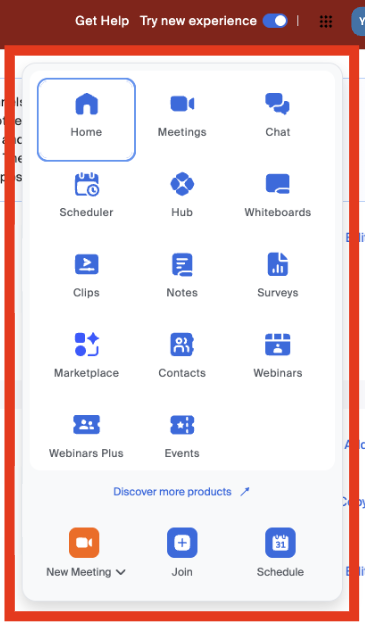
New product waffle
In the new experience, you’ll find a new product waffle menu in the top-right corner of the header.
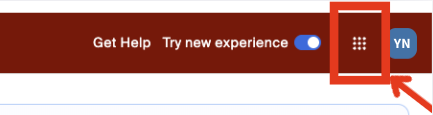
The new waffle menu:
- Contains certain items previously found in the left navigation panel.
- Opens each item in a new tab on the web, allowing you to configure a product’s settings on its own page.
- Is customizable, allowing you to drag and drop items to reorder them.
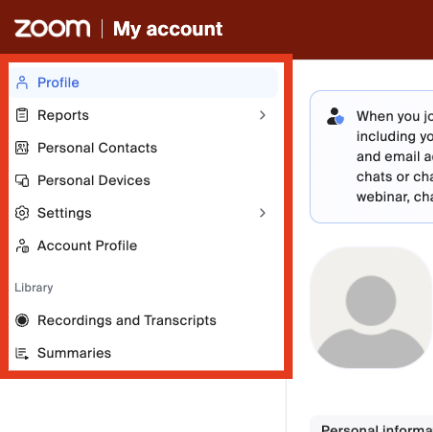
Updated left sidebar menu
These options remain accessible from the left navigation:
- Profile: Manage your personal profile information, including your name and photo.
- Reports (previously Analytics & Reports): Access usage reports for meetings, webinars, and more.
- Personal Contacts: Store and manage your personal contacts in Zoom.
- Personal Devices: Manage collaboration devices configured on your account.
- Settings: Enable or disable Zoom features for your own use.
- Account Profile: Information about your account type.
- Recordings and Transcripts: Access your cloud recordings, recordings shared with you, computer recordings, and transcripts.
- Summaries: Access your AI Companion meeting summaries and summaries shared with you.
New quick access for “My account”
The new Zoom experience also introduces a new profile menu option in the header. In the top-right corner, next to the product waffle menu, click your image or initials to view the menu. Then choose “My account” to access your profile settings.
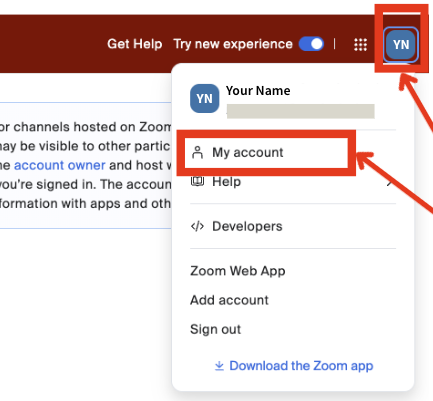
The redesigned navigation in the Zoom web portal aims to improve access to profile settings and products.
Get help
If you have any questions or need assistance with these changes, contact our University IT (UIT) Service Desk at 650-725-4357 (5-HELP), Monday through Friday, 7 a.m. to 6 p.m. or submit a Help request.
DISCLAIMER: UIT News is accurate on the publication date. We do not update information in past news items. We do make every effort to keep our service information pages up-to-date. Please search our service pages at uit.stanford.edu/search.
What to read next:

Action Required: Upcoming Upgrades and Changes to Stanford VPN
Google Drive Files Become Unavailable 180 Days After Owner’s Account Is Suspended