 University IT
Propose a New Standard Change template
Completing Standard Change Template Proposal
The Standard Change Template Proposal process includes:
- completing a Proposal for a Standard Change Template
- request approval for the proposal
- connecting with a Change Manager to schedule a visit to CAB
- reviewing Proposal for the Standard Change Template with CAB
- approval by CAB for the Standard Change Template Proposal
The Proposal for a Standard Change Template is two parts.
The first part is about the proposal, why it's needed what justifications you have for having it approved.
- Select a Category for the template (the folder/group of template)
If you don't see an appropriate category, call a Change Manager for help or to create a new category. - Enter Title for the template (aids user in selecting correct template)
- Enter description of the template (appears below name and aids user in selecting correct template)
- Provide at least 3 sample changes which help to justify the work being a Standard Change (low risk, highly successful)
The second part is Template content.
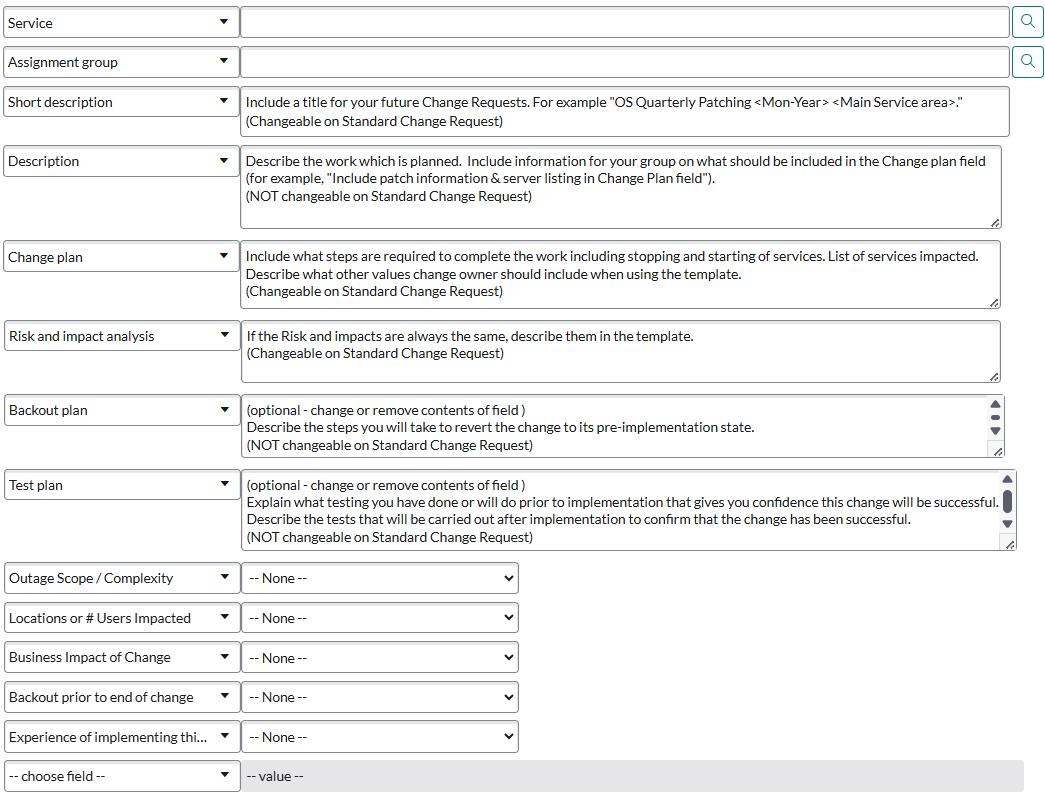
- Fields that must be completed on the 'Propose a New Standard Change template':
- Service (Changeable on Standard Change Request)
- Assignment group (limited to this group, NOT Changeable on Standard Change Request)
- Short description of the change (Changeable on Standard Change Request)
- Description (NOT Changeable on Standard Change Request)
- Change Plan (Changeable on Standard Change Request)
- Risk and impact analysis (NOT Changeable on Standard Change Request)
- Backout plan (NOT Changeable on Standard Change Request)
- Test plan (NOT Changeable on Standard Change Request)
- Risk Assessment questions (sets Risk/Impact level, should be 4 or 5, see excel worksheet)
(NOT Changeable on Standard Change Request)
Last modified
